


Not every popular digital product makes money, so choosing the right one matters. You might spend hours searching for ideas without knowing what actually sells. Picking the wrong product can waste your time, money, and effort.
The top selling digital products solve real problems and attract customers willing to pay. From Canva templates to ebooks and online courses, some offer affordable ways to start. However, understanding demand, competition, and earning potential helps you make smarter choices.
This guide explores 25 top selling digital products that can make money in 2026. You’ll discover profitable product ideas, suitable selling platforms, and the skills needed to get started. We’ll also explain startup costs, customer demand, and how to choose the right product.
What Are the Top Selling Digital Products in 2026?
The top selling digital products in 2026 include ebooks, online courses, Canva templates, digital planners, spreadsheets, and creative assets. These products help customers complete tasks, learn skills, or access useful resources without waiting for physical delivery. Sellers can distribute the same digital file repeatedly, although marketing and maintenance still require work.
According to Etsy’s 2025 Annual Report, the marketplace had 86.5 million active buyers and 5.6 million active sellers. These figures cover Etsy’s entire marketplace, not digital products specifically. However, they demonstrate the scale of an established marketplace where original digital downloads can be sold.
Templates, educational resources, and productivity tools offer accessible opportunities for beginners. Software, specialized courses, and memberships can support more complex business models. Actual profitability depends on customer demand, product quality, pricing, competition, and operating costs.
25 Top Selling Digital Products to Sell in 2026
The following 25 digital product categories offer opportunities for creators, entrepreneurs, educators, designers, and software developers in 2026. Each category addresses a different customer need and requires different levels of experience. These recommendations aren’t ranked by verified sales volume because comparable marketplace sales figures aren’t publicly available.
1. Ebooks and Digital Guides
Ebooks and digital guides are downloadable publications that explain a subject or teach a practical skill. Examples include personal finance guides, fitness programs, travel itineraries, and small business manuals. Customers purchase them to access organized information without searching through separate resources.
You can create an ebook using Google Docs, Microsoft Word, or Canva. Amazon KDP supports Kindle publishing, while Gumroad and Shopify can distribute downloadable PDF guides. Best for: Writers, educators, consultants, and professionals with knowledge in a specific subject.

A guide about managing freelance finances serves a clearer audience than a general money management ebook. Include worksheets, examples, or useful calculations when they improve the learning experience. Accurate information and a clear promise make the product easier for customers to evaluate.
2. Online Courses
Online courses provide structured lessons through recorded videos, exercises, presentations, and downloadable learning materials. Examples include Excel training, graphic design tutorials, photography classes, and programming courses. Customers purchase them to develop practical skills through organized instruction.
Platforms such as Udemy, Teachable, and Thinkific support course hosting and delivery. Creating a course requires lesson planning, recording equipment, editing, and student support. Best for: Teachers, trainers, coaches, and professionals who can demonstrate their expertise.
A focused course teaching restaurant owners how to use spreadsheets may address a specific business problem. Include exercises that let learners practice the subject rather than simply watching videos. Course pricing should reflect instructional depth, production quality, and the value delivered.
3. Digital Planners
Digital planners help people organize daily schedules, appointments, budgets, goals, and personal activities. Examples include Goodnotes planners, weekly study schedules, wedding organizers, and fitness journals. Customers use them on tablets, computers, or compatible planning applications.
Canva, Keynote, and PDF design software can help create downloadable planners. Sellers can offer these products through Etsy, Gumroad, or Shopify. Best for: Beginners, designers, students, and creators interested in personal organization.
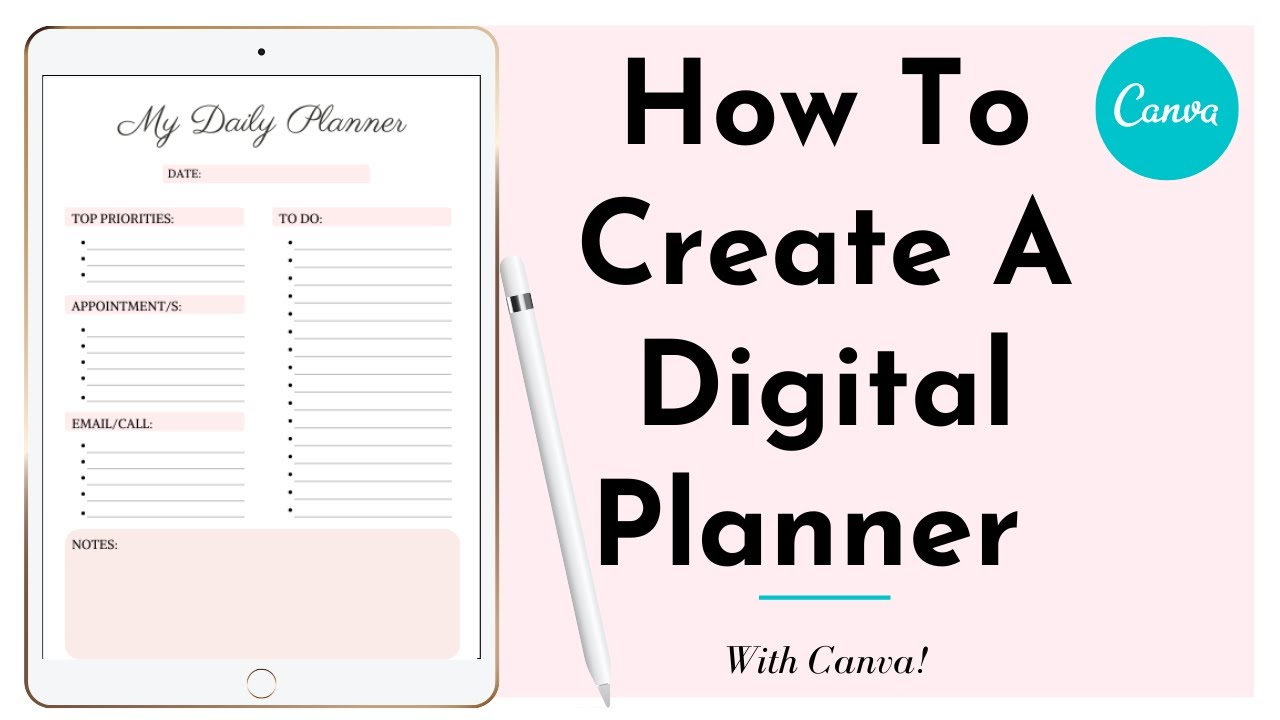
A wedding planner could include guest lists, payment trackers, seating charts, and vendor schedules. Provide clear instructions explaining how customers should use the downloadable file. Test navigation, page links, and compatibility before publishing your planner.
4. Printable Worksheets and Checklists
Printable worksheets and checklists provide ready made documents for completing specific tasks or activities. Examples include household cleaning schedules, children’s worksheets, meal planners, and moving checklists. Buyers download the files and print them whenever needed.
Canva and Google Docs can create printable documents without advanced design knowledge. Etsy and independent websites support selling original downloadable resources. Best for: Parents, teachers, beginners, and creators developing practical household resources.
A printable moving checklist could organize packing, address changes, and utility transfers. Include simple instructions and enough writing space for customers to use the document. Offer common paper sizes when your intended audience uses different printing formats.
5. Canva Templates
Canva templates are editable designs that customers personalize without creating layouts from scratch. Examples include business presentations, wedding invitations, restaurant menus, and marketing flyers. Entrepreneurs and content creators purchase them to save design time.
You can create original templates in Canva and provide editable access links. Etsy, Gumroad, and Shopify are possible distribution channels. Best for: Graphic designers, freelancers, social media managers, and visually creative beginners.
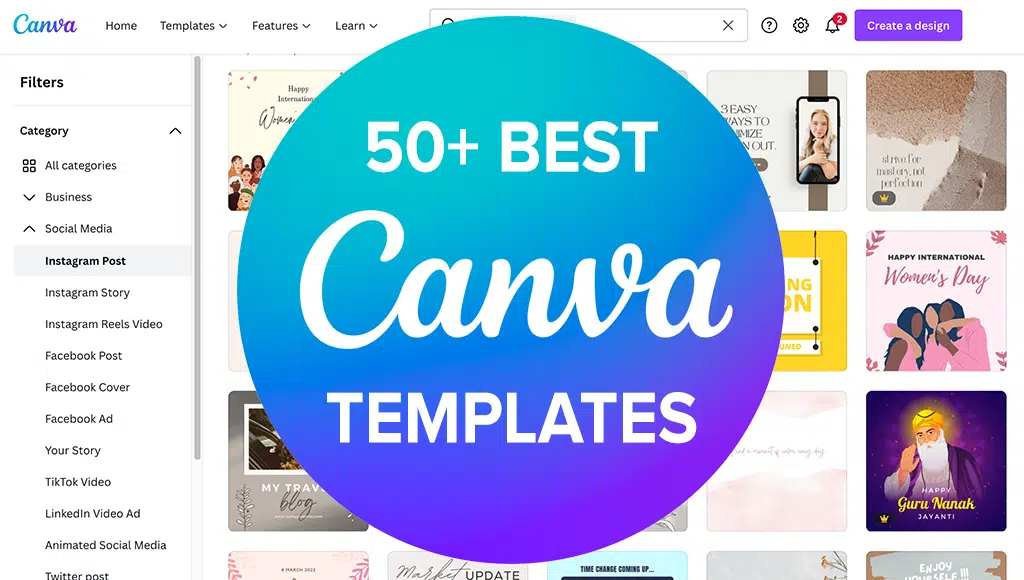
For example, a restaurant marketing kit could include menus, promotional graphics, and event announcements. According to Canva’s licensing guidance, templates containing Pro Content must be distributed through Canva template links. Always check commercial usage permissions before selling or distributing your designs.
6. Notion Templates
Notion templates are reusable workspaces designed for managing information, projects, schedules, and personal goals. Examples include student dashboards, habit trackers, content calendars, and freelance client management systems. Customers purchase them to avoid building complicated organizational systems themselves.
Creators can build these products directly inside Notion and share duplicable template links. Notion Marketplace and Gumroad provide distribution options. Best for: Freelancers, productivity creators, students, and business consultants.
A freelance dashboard could combine client information, project deadlines, invoices, and task tracking. Include sample information so customers understand how the workspace functions. Clear instructions and simple navigation can reduce customer support questions.
7. Google Sheets and Excel Templates
Spreadsheet templates help customers manage calculations, financial information, inventory, and business performance. Examples include monthly budget trackers, rental property calculators, expense dashboards, and inventory spreadsheets. Buyers value these products because they reduce repetitive data entry and calculation work.
Google Sheets and Microsoft Excel offer the necessary creation tools. Etsy, Gumroad, and Shopify can distribute spreadsheet files or access instructions. Best for: Accountants, financial educators, analysts, and creators familiar with spreadsheet formulas.
A small business expense tracker could automatically calculate monthly spending and category totals. Test every formula using different example values before publishing. Provide instructions for customers unfamiliar with spreadsheet functions.
8. Social Media Templates
Social media templates provide reusable designs for publishing content across Instagram, Pinterest, Facebook, and LinkedIn. Examples include Instagram carousel layouts, Pinterest graphics, promotional posts, and content scheduling calendars. Businesses purchase these resources to maintain consistent branding and reduce content preparation time.
Canva, Figma, and Adobe Express can help create editable marketing designs. Creative Market, Etsy, and independent websites offer selling opportunities. Best for: Content creators, digital marketers, freelancers, and graphic designers.

A beauty salon template kit could contain appointment promotions, service announcements, and customer testimonial layouts. Creating resources for a specific industry makes the intended customer easier to identify. Include editable text areas and clear instructions for replacing photographs or branding elements.
9. Resume and Cover Letter Templates
Resume and cover letter templates help job seekers present qualifications and experience clearly. Examples include graduate resumes, professional CV layouts, career change templates, and matching application letters. Customers purchase them to simplify document formatting and job applications.
Microsoft Word, Google Docs, and Canva can create editable career documents. Etsy and Gumroad support downloadable resume packages. Best for: Career coaches, recruitment professionals, designers, and freelancers.
A resume designed for accounting professionals may use a different layout than a creative portfolio resume. Include versions with simple formatting that applicant tracking systems can read reliably. Avoid promising interviews or employment because hiring decisions depend on additional factors.
10. Business and Marketing Templates
Business and marketing templates help entrepreneurs manage planning, communication, finances, and promotional activities. Examples include business plans, client onboarding documents, content calendars, and sales tracking dashboards. Customers purchase them to simplify recurring administrative work.
You can create business documents using Google Docs, Excel, Canva, or Notion. Gumroad, Shopify, and your own website are potential selling channels. Best for: Business consultants, marketers, freelancers, and experienced entrepreneurs.\

A freelancer onboarding package could include questionnaires, project timelines, and client communication templates. Build the package around one clear business process rather than combining unrelated documents. Review any legal or financial language carefully before publishing professional resources.
11. Digital Art and Printable Wall Art
Digital art and printable wall art allow customers to purchase artwork without physical shipping. Examples include botanical illustrations, nursery prints, abstract designs, and minimalist typography posters. Buyers download the artwork and arrange printing independently.
Artists can create original designs using Procreate, Adobe Illustrator, or drawing software. Etsy and Creative Market support selling suitable downloadable creative products. Best for: Illustrators, digital artists, photographers, and graphic designers.
A nursery artwork collection could feature matching animal illustrations in several print sizes. Provide high resolution files and clear printing instructions to reduce customer confusion. Original artwork and consistent design quality help distinguish one collection from another.
12. Stock Photos
Stock photos are licensed photographs used in websites, advertising campaigns, presentations, and digital publications. Examples include workplace photography, food images, lifestyle portraits, and product backgrounds. Businesses purchase them instead of organizing individual photography sessions.
Adobe Stock, Shutterstock, and other licensing platforms distribute original photographic content. Earnings depend on download activity, licensing arrangements, and marketplace competition. Best for: Photographers, visual creators, and professionals with original image collections.
A photographer could specialize in authentic small business workplace imagery rather than generic office photographs. Commercial licensing may require permission from recognizable people or property owners. Review each marketplace’s quality and release requirements before submitting photographs.
13. Stock Videos and Video Templates
Stock videos and video templates provide footage or editable projects for marketing and content production. Examples include aerial footage, animated introductions, product demonstrations, and promotional video layouts. Businesses and video editors use these resources to reduce production time.
Adobe Premiere Pro, After Effects, and DaVinci Resolve support video asset development. Adobe Stock, Envato, and independent stores provide potential selling channels. Best for: Videographers, motion designers, video editors, and creative agencies.
A restaurant promotion package could include editable food advertisements and menu announcement animations. State the required software version, video resolution, and included file formats. Buyers should understand whether they’re purchasing finished footage or an editable project.
14. Fonts, Icons, and Graphic Design Assets
Graphic design assets include original fonts, icons, illustrations, textures, and reusable visual elements. Examples include handwritten fonts, navigation icon collections, vector graphics, and decorative patterns. Designers purchase them to complete branding and marketing projects more efficiently.
Adobe Illustrator, Affinity Designer, and specialized font software support asset creation. Creative Market and independent stores are suitable distribution options. Best for: Graphic designers, illustrators, typography specialists, and digital artists.
An icon pack for healthcare websites could include appointment, prescription, and patient communication symbols. Provide consistent sizing, editable formats, and clear licensing terms. Customers need to know whether commercial projects and redistribution are permitted.
15. Lightroom Presets and Photo Filters
Lightroom presets and photo filters apply saved color and lighting adjustments to photographs. Examples include wedding presets, portrait editing looks, travel photography filters, and cinematic color effects. Photographers purchase them to speed up editing and create a consistent visual style.
Adobe Lightroom allows creators to develop and export reusable presets. Etsy, Gumroad, and photography websites can distribute compatible preset files. Best for: Photographers, photo editors, influencers, and visual content creators.
A wedding preset collection could include adjustments for indoor portraits and outdoor ceremonies. Provide realistic before and after examples using different photographs. Explain that results depend on lighting conditions, image exposure, and camera settings.
16. Website Templates and Themes
Website templates and themes provide prepared layouts for building websites more quickly. Examples include portfolio websites, restaurant layouts, ecommerce themes, and business landing pages. Customers purchase them to reduce design and development work.
Webflow, WordPress, Shopify, and other website platforms support different template formats. Theme marketplaces and independent developer websites provide selling opportunities. Best for: Web designers, developers, UX specialists, and digital agencies.
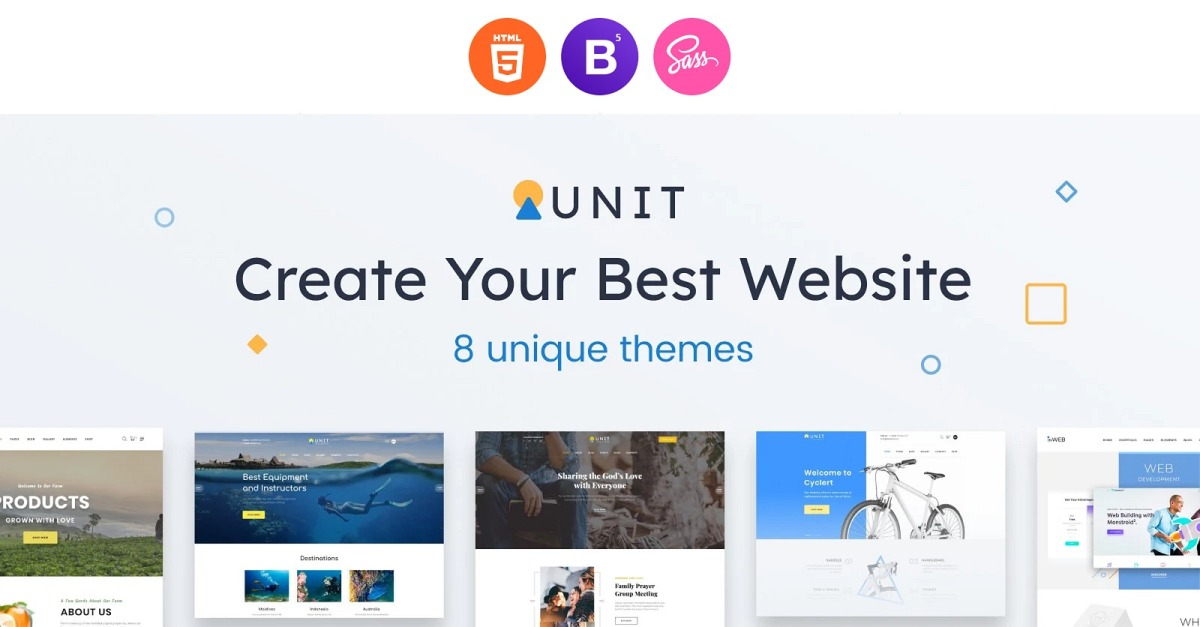
A restaurant website template could include menus, reservation information, contact details, and mobile navigation. Test loading performance, accessibility, and responsiveness before selling. Themes may require ongoing updates when website platforms change.
17. WordPress Plugins
WordPress plugins add specific functionality to websites without requiring custom development for every customer. Examples include appointment booking tools, reporting dashboards, form extensions, and product comparison features. Website owners purchase plugins to solve operational or technical problems.
Developers commonly use PHP, JavaScript, and WordPress development resources to create plugins. Premium versions can be distributed through developer websites or suitable marketplaces. Best for: WordPress developers, software engineers, and technically experienced entrepreneurs.
A booking plugin for tutors could manage available appointments and confirmation messages. Software products require regular testing, security maintenance, and compatibility checks. Support responsibilities should be included when calculating potential profitability.
18. Software and Mobile Apps
Software and mobile apps provide digital functionality through desktop applications, mobile devices, or web browsers. Examples include invoice generators, appointment scheduling systems, expense trackers, and productivity applications. Customers purchase software when it saves time or improves an important workflow.
Developers can offer one time purchases, paid upgrades, or recurring subscriptions. App stores and independent websites provide different distribution options. Best for: Software developers, technical founders, and established businesses.
A scheduling application for independent tutors could manage lesson bookings and payment reminders. Development costs may include hosting, security, testing, and customer support. Sustainable software revenue depends on solving a recurring problem reliably.
19. AI Prompts and AI Productivity Tools
AI prompts and productivity tools help customers complete tasks using artificial intelligence applications. Examples include research workflows, customer support systems, reporting assistants, and content planning templates. Buyers value resources that produce consistent results and save repetitive work.
Creators can package tested workflows, original prompt libraries, or specialized automation tools. Gumroad, Shopify, and independent websites support suitable digital products. Best for: Marketers, automation specialists, consultants, and experienced AI users.
A customer service workflow could organize common questions and suggest draft responses for human review. Test the output carefully because AI systems can produce inaccurate information. Avoid selling generic prompt collections without demonstrating a practical customer benefit.
20. Music, Sound Effects, and Audio Files
Digital audio products include original music, recorded sound effects, audio loops, and background tracks. Examples include podcast introductions, cinematic effects, meditation recordings, and game audio. Video editors, podcasters, and game developers purchase licensed audio for their projects.
Audacity, Ableton Live, and audio production software can support recording and editing. AudioJungle, Pond5, and independent music stores offer distribution opportunities. Best for: Musicians, sound designers, composers, and audio engineers.
A podcast audio package could contain original introduction music and notification sounds. Explain permitted commercial usage and whether attribution is required. Only distribute recordings you own or have permission to license.
21. Educational Resources and Lesson Plans
Educational resources and lesson plans help teachers, tutors, and parents deliver structured learning activities. Examples include mathematics worksheets, reading exercises, classroom presentations, and science activity packs. Customers purchase them to save preparation time and support specific educational goals.
Canva, PowerPoint, and Google Docs can create printable and editable educational materials. Teachers Pay Teachers and independent stores provide potential selling channels. Best for: Teachers, tutors, curriculum writers, and educational creators.
A reading comprehension package could target one grade level and include answer keys. Align educational content with the learner’s age and expected ability. Clear instructions help teachers use the resource without additional preparation.
22. Digital Craft Patterns
Digital craft patterns provide downloadable instructions for completing handmade projects. Examples include crochet patterns, knitting guides, sewing templates, and embroidery designs. Hobbyists purchase them to reproduce specific projects using their own materials.
Creators can prepare PDF instructions containing diagrams, measurements, photographs, and supply lists. Etsy, Ravelry, and independent craft shops offer potential selling opportunities. Best for: Crafters, sewing instructors, knitting enthusiasts, and pattern designers.
A beginner crochet pattern should explain materials, sizing, and the required techniques. Test the instructions by completing the project before publishing. Clear photographs can help customers understand complicated construction steps.
23. Online Workshops and Masterclasses
Online workshops and masterclasses teach specific skills through focused sessions or recorded instruction. Examples include photography editing workshops, watercolor classes, business planning sessions, and spreadsheet training. Customers purchase them when they want practical guidance on a defined subject.
Zoom and course hosting platforms support different workshop delivery methods. Creators can sell recorded sessions repeatedly after completing the initial presentation. Best for: Teachers, coaches, consultants, artists, and professional trainers.
A two hour budgeting workshop could teach participants how to build a spreadsheet tracker. Include downloadable exercises and clear learning objectives when appropriate. Live workshops require scheduled teaching, while recorded versions can reduce repeated delivery work.
24. Memberships and Subscription Content
Digital memberships and subscriptions provide continued access to exclusive content, communities, or useful resources. Examples include premium research libraries, monthly template collections, educational communities, and professional resource databases. Customers pay regularly when the service continues delivering relevant value.
MemberPress, Patreon, and other membership platforms can manage subscriber access and recurring payments. Revenue depends on attracting subscribers and maintaining their interest over time. Best for: Educators, creators, consultants, and businesses with established audiences.
A marketing membership could provide monthly content calendars and campaign planning resources. Subscribers need clear information about what their payments include. Consistent delivery and customer support are important for reducing cancellations.
25. Digital Product Bundles and Resource Kits
Digital product bundles combine related downloadable resources into one package. Examples include wedding planning kits, business startup toolkits, branding collections, and teacher resource packages. Customers purchase bundles when the included resources solve a broader problem together.
Creators can combine original templates, guides, worksheets, and design assets into organized collections. Etsy, Gumroad, and Shopify support distributing suitable digital packages. Best for: Designers, educators, marketers, and established digital product sellers.
A freelancer starter kit could contain proposal templates, invoices, project trackers, and onboarding documents. Explain exactly what each package includes to prevent misleading expectations. Bundles can increase order value when their contents provide meaningful additional value.
Quick Comparison of the Best Selling Digital Products
The best digital products to sell depend on creation difficulty, customer demand, ongoing costs, and your existing skills. Canva templates and printables can be created without programming, while software requires technical knowledge. Comparing product characteristics helps narrow your choices before investing time or money.
| Digital Product | Difficulty | Revenue Model | Suitable Platform |
| Ebooks | Low to Medium | One time sale | Amazon KDP, Gumroad |
| Online Courses | Medium to High | Course purchase | Udemy, Teachable |
| Digital Planners | Low | One time sale | Etsy |
| Canva Templates | Low to Medium | One time sale | Etsy, Gumroad |
| Notion Templates | Medium | One time sale | Notion Marketplace |
| Spreadsheet Templates | Medium | One time sale | Etsy, Gumroad |
| Digital Art | Medium | One time sale | Etsy, Creative Market |
| Stock Photos | Medium | Licensing | Adobe Stock |
| Website Themes | High | Purchase or license | Theme marketplaces |
| WordPress Plugins | High | License or subscription | Independent website |
| Software | High | Purchase or subscription | App store, website |
| Memberships | Medium to High | Recurring subscription | MemberPress, Patreon |
Digital planners, Canva templates, and printable worksheets are accessible starting points for beginners. Online courses, software, and subscription services may support higher purchase values or recurring revenue. However, higher prices don’t automatically mean stronger profit margins.
How We Selected the Top Selling Digital Products
We selected these 25 categories using customer usefulness, marketplace relevance, creation requirements, and potential revenue models. The evaluation includes established digital products such as ebooks, online courses, and design templates. It also considers specialized resources such as AI workflows, spreadsheet calculators, and software subscriptions.
We reviewed common product categories discussed by established ecommerce and digital selling platforms. We also considered whether each product solves a recognizable customer problem and supports practical distribution. The list is a curated opportunity guide, not an independently verified ranking of actual 2026 sales.
Sales popularity and profitability are different measurements, so neither should be assumed from marketplace visibility alone. Marketplace reviews, search demand, and customer feedback can help identify interest but don’t establish exact sales. Sellers should validate their particular product idea before investing heavily in development.
Which Digital Products Are Best for Different Sellers?
The right digital product depends on your skills, budget, available time, and intended customers. Beginners often benefit from simpler downloads, while experienced professionals can offer more specialized resources. Match your knowledge to a customer problem before choosing a product category.
Best Digital Products for Beginners
Printable checklists, basic digital planners, and Canva templates are accessible starting points for beginners. These products can be developed using Canva or Google Docs without programming knowledge. Start with one clear product, such as a weekly meal planner, before expanding.
Best Digital Products for Designers and Content Creators
Digital art, stock photography, social media templates, and graphic assets suit creators with visual skills. Designers can sell original branding kits, while photographers can develop presets or licensed image collections. Existing portfolios may also help demonstrate product quality to potential customers.
Best Digital Products for Teachers, Coaches, and Freelancers
Educational worksheets, online courses, ebooks, and business templates help professionals package existing knowledge. Teachers can create lesson plans, while consultants can develop project trackers or client onboarding documents. Choose a specific problem that your professional experience helps customers solve.
Best Digital Products for Developers and Small Businesses
Website themes, WordPress plugins, software applications, and subscription resources suit technically experienced sellers. A developer might create a booking tool, while a business consultant could sell industry specific reporting templates. Calculate maintenance and support responsibilities before selecting a complex product.
Which Digital Products Are the Most Profitable?
Online courses, specialized software, premium templates, and subscription products can offer attractive profit potential. However, no category guarantees higher profits because development costs and customer demand vary. The important measurement is revenue remaining after expenses, not simply the selling price.
High Profit Margin Digital Products
Ebooks, printables, and spreadsheet templates can have relatively low reproduction costs after initial development. For example, selling 100 spreadsheet templates at $15 produces $1,500 in gross revenue. Software fees, payment processing, marketing, and production expenses must still be deducted.
A specialized product may support a higher price when it saves customers meaningful time. For example, an accurate inventory calculator could offer more business value than a decorative printable. Test customer willingness to pay instead of assuming higher prices will increase profitability.
One Time Sales vs. Recurring Revenue
One time products generate revenue when customers purchase ebooks, templates, courses, or downloadable files. Recurring products generate periodic payments through software subscriptions, paid communities, or continuing resource access. Each model involves different customer expectations and operating responsibilities.
For example, 50 subscribers paying $20 monthly generate $1,000 in monthly gross revenue. However, cancellations, fees, support, and ongoing content production reduce the amount retained. Subscription businesses need continuing value to maintain those payments.
Where Can You Sell Digital Products Online?
Digital products can be sold through Etsy, Amazon KDP, Creative Market, Shopify, Gumroad, Udemy, and independent websites. Each platform serves different customer needs and product formats. Consider marketplace discovery, payment processing, fees, and customer ownership before choosing.
Etsy, Amazon KDP, and Creative Market
Etsy supports original downloadable products such as planners, invitations, worksheets, and digital artwork. Amazon KDP focuses on publishing ebooks, while Creative Market serves customers seeking design assets. These platforms offer marketplace discovery but also involve competition and selling requirements.
Etsy requires digital items to be made or designed by the seller, according to its digital listing rules. Amazon KDP offers different ebook royalty arrangements depending on pricing and eligibility. Review each platform’s policies before uploading products.
Shopify, Gumroad, and Your Own Website
Shopify supports branded digital product stores through suitable delivery applications. Gumroad provides checkout and delivery features for downloadable resources and compatible digital offerings. An independent website offers greater control over branding and customer relationships.
However, independent stores need visitors from search engines, email marketing, social media, or advertising. Platform fees and technical requirements also differ between services. Choose the selling channel that matches your product and audience.
Udemy and Membership Platforms
Udemy focuses on online education, including business, programming, design, and professional skills. MemberPress and Patreon provide ways to manage paid memberships and exclusive content access. These platforms suit products requiring structured learning or continued customer engagement.
Course marketplaces may provide discovery opportunities but impose pricing and revenue sharing rules. Membership platforms require regular updates or valuable continuing access. Compare features and costs before choosing a provider.
How to Find Digital Products With High Demand and Low Competition
Finding digital products with demand and manageable competition requires customer research and product testing. Popular search terms don’t guarantee that customers will purchase what you create. Focus on specific unmet needs rather than broad product categories.
Research Customer Demand and Popular Niches
Start by reviewing relevant listings on Etsy, Creative Market, Amazon, or specialized marketplaces. Examine product features, customer reviews, prices, and recurring complaints to identify possible opportunities. Google Trends can also help reveal how interest changes across different search terms.
For example, compare demand for general budget planners with specialized freelance expense trackers. The second product serves a narrower audience with a clearly defined financial task. However, you still need evidence that those customers are willing to pay.
Validate Your Digital Product Idea Before Selling
Validate your product idea before spending heavily on production or advertising. Review at least 10 competing listings and record their features, positioning, and customer feedback. Then create a basic version that solves one clear problem.
Show the prototype to potential customers and ask them to complete a realistic task. A small paid test or preorder can provide stronger demand evidence than positive comments alone. Measure actual purchases, questions, and customer behavior before expanding.
How Much Does It Cost to Create and Sell Digital Products?
Digital product startup costs depend on the tools, selling platform, and complexity of the product. Basic printables may require little spending, while software and professional courses involve larger production expenses. Customer acquisition and ongoing maintenance also affect the total investment.
Product Creation and Platform Costs
Canva, Google Docs, and Google Sheets offer accessible ways to create basic downloadable resources. More complex products may require paid software, development services, recording equipment, or hosting. Marketplace costs should be included before calculating expected profit.
According to Etsy’s official fee guide, listings generally cost $0.20, with a 6.5% transaction fee. Payment processing, advertising, taxes, and other applicable charges are separate. Etsy may also charge a location dependent shop setup fee.
Digital Product Pricing and Profit Margins
Price your digital product according to customer value, production effort, expenses, and competing offers. A specialized business calculator may justify a different price from a simple printable checklist. Test pricing carefully rather than copying competitors without understanding their costs.
For example, 50 sales at $20 generate $1,000 in gross revenue. If total expenses equal $250, the remaining $750 represents profit before taxes and uncounted costs. Include production time when evaluating whether the product is financially worthwhile.
Best Tools for Creating Digital Products
The best creation tools depend on whether you’re selling ebooks, templates, illustrations, software, or educational materials. Beginners can start with free applications before investing in paid subscriptions. Professional creators may need specialized tools for complex projects.
| Tool | Main Use |
| Canva | Printables, planners, marketing templates |
| Google Docs | Ebooks, worksheets, guides |
| Google Sheets | Financial trackers, calculators |
| Notion | Productivity dashboards |
| Adobe Illustrator | Vector art, graphic assets |
| Adobe Lightroom | Photography presets |
| Figma | Interface and website designs |
| Audacity | Audio recording and editing |
| OBS Studio | Screen recordings and lessons |
| Visual Studio Code | Software and plugin development |
Canva and Google Docs are practical starting points for basic digital downloads. Figma, Illustrator, and development software support more specialized products. Always check licensing, export compatibility, and customer requirements before publishing.
How to Start Selling Digital Products Online
You can start selling digital products by selecting one customer problem, creating a useful resource, and choosing a platform. Building a complete product collection isn’t necessary for your first launch. A focused product provides an opportunity to test demand and improve your selling process.
Follow these seven steps:
- Choose a customer group: Identify an audience such as teachers, freelancers, photographers, or small business owners.
- Research customer demand: Examine search trends, competing listings, and buyer feedback.
- Select your product: Choose a format that matches your existing skills and available budget.
- Create the first version: Develop your product using Canva, Google Sheets, Notion, or suitable professional tools.
- Choose a selling platform: Compare marketplace reach, fees, delivery features, and payment availability.
- Prepare your listing: Include accurate descriptions, useful previews, compatibility information, and clear pricing.
- Promote and improve: Use SEO, social media, email marketing, and customer feedback to refine your product.
Start with one product that solves a clear problem for a specific audience. Track visits, purchases, conversion rates, and customer questions after launching. Expand into related downloads only when you understand what customers need.
Common Mistakes to Avoid When Selling Digital Products
The biggest digital product selling mistakes include skipping research, underestimating costs, and offering unclear customer value. These problems can prevent sales even when a product looks professionally designed. Avoid the following six mistakes before launching.
- Ignoring demand: Creating ebooks or templates without checking customer interest.
- Choosing broad niches: Competing with generic planners or guides without targeting a clear audience.
- Using poor previews: Failing to demonstrate what customers receive.
- Underpricing products: Forgetting platform fees, advertising, and production time.
- Ignoring copyright: Reselling fonts, images, or designs without appropriate permissions.
- Expecting automatic sales: Publishing downloads without marketing or product improvement.
Successful product improvement depends on understanding actual customer behavior. Review customer feedback, support requests, and reasons for refunds. Use this information to improve product quality and clarify your listings.
Digital Product Trends and Opportunities in 2026
Digital product opportunities in 2026 include AI productivity tools, specialized templates, subscription resources, and online education. These categories can serve customers seeking practical ways to simplify work or develop skills. However, emerging interest doesn’t automatically establish high sales or long term profitability.
AI resources may include tested business workflows, reporting assistants, and content planning systems. Specialized templates can address problems involving accounting, education, project management, and industry specific operations. Subscription products can provide continued access to updated resources or professional learning materials.
The strongest product opportunities solve specific problems rather than simply following popular technology trends. Research customer needs and competing offers before investing in new categories. Evaluate the time required for maintenance because AI tools and software services can change quickly.
Frequently Asked Questions
What Is the Easiest Digital Product to Sell?
Printable checklists, Canva templates, and simple digital planners are accessible options for beginners. They can be created using familiar design tools without programming knowledge. However, ease of creation doesn’t guarantee customer demand or sales.
What Digital Products Sell Best on Etsy?
Popular digital download categories on Etsy include printable planners, wedding invitations, digital art, and editable templates. Actual sales performance varies by niche, season, price, and competition. Check current marketplace listings and customer feedback before selecting a product.
Can You Make Passive Income Selling Digital Products?
Yes, digital products can generate repeat sales after the initial creation work. However, marketing, updates, customer support, and platform management often require continued effort. Earnings depend on demand, pricing, and the ability to attract customers.
Can You Sell Digital Products Without a Website?
Yes, Etsy, Gumroad, and Creative Market allow eligible creators to sell digital products without independent websites. These platforms provide selling functionality and different levels of customer discovery. Check their payment availability, fees, and product policies before registering.
Are AI Generated Digital Products Legal to Sell?
AI generated digital products may be sold when applicable laws and platform licensing rules permit their distribution. Etsy requires disclosure for qualifying sellers prompted AI creations, while Amazon KDP requires disclosure of AI generated book content. Review copyright ownership, commercial licensing rights, and platform rules before publishing. See Etsy’s seller policy and Amazon KDP’s content guidelines.
Final Thoughts
The top selling digital products in 2026 offer different opportunities depending on your skills, customers, and available resources. Canva templates, ebooks, online courses, and software can serve very different audiences. Their earning potential depends on useful content, demand, realistic pricing, and consistent marketing.
Start by researching one product that solves a specific customer problem. Create a useful version, test whether customers will pay, and improve it using feedback. A focused approach gives you a clearer path toward building a sustainable digital product business.