

Starting a VPS company means selling isolated virtual servers under your own brand. You can resell infrastructure, rent dedicated servers, or operate your own hardware. Each model changes your costs, responsibilities, and level of control.
A VPS business needs more than a server and website. You also need virtualization, networking, billing, provisioning, monitoring, backups, security, and customer support. These systems must work together before you accept paying customers.
This guide explains how to start a virtual private server company in 2026. You will learn how to choose infrastructure, calculate costs, automate provisioning, manage capacity, and protect your network. You will also learn how to launch, attract customers, and scale beyond your first node.
What You Need to Start a VPS Hosting Company
You need infrastructure, virtualization, networking, billing, operations, support, and legal processes to start a VPS hosting company. Each component controls a different part of your service. Missing one can create billing, performance, security, or support problems.
A basic VPS business needs these components:
- Infrastructure: VPS reseller capacity, rented dedicated servers, or colocated hardware
- Virtualization: KVM, Proxmox VE, Virtualizor, or SolusVM
- Networking: IPv4, IPv6, gateways, subnets, and reverse DNS
- Billing: WHMCS, Blesta, or another recurring billing platform
- Provisioning: APIs, server modules, templates, and automation
- Operations: monitoring, backups, restore testing, and capacity management
- Security: DDoS protection, fraud checks, firewalls, and abuse handling
- Support: ticketing, incident handling, and customer communication
- Legal: Terms of Service, AUP, Privacy Policy, SLA, and refund rules
Your billing system and infrastructure must remain synchronized. A successful payment should create one correctly configured VPS. Renewals, upgrades, suspensions, and cancellations should update the service automatically.
Choose Your VPS Business Model
Choose between VPS reselling, rented dedicated servers, and owned or colocated hardware. Your choice affects startup cost, technical workload, control, and scalability. Start with the model that matches your budget and operational experience.
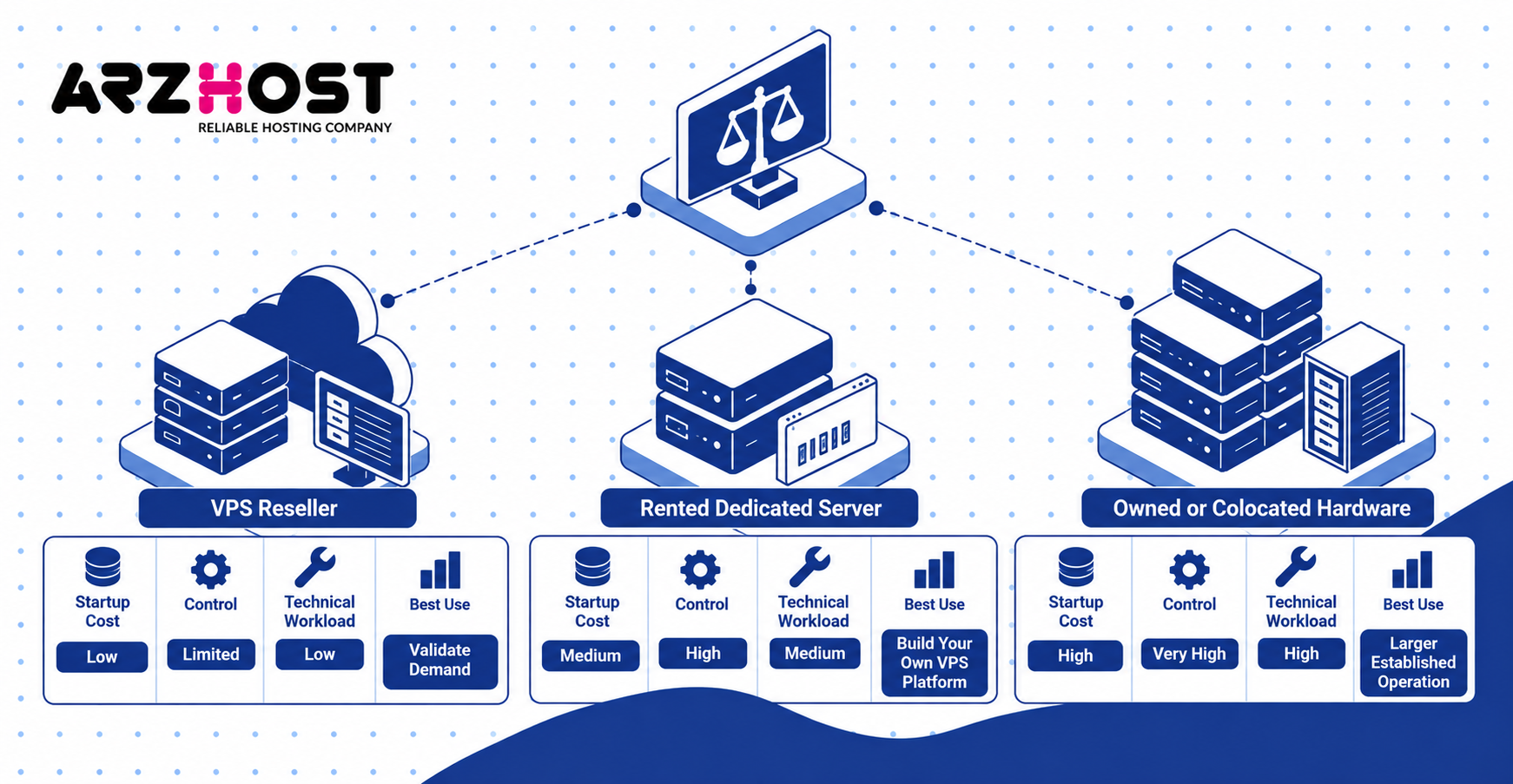
| Business model | Startup cost | Control | Technical workload | Best use |
| VPS reseller | Low | Limited | Low | Validate demand |
| Rented dedicated server | Medium | High | Medium | Build your own VPS platform |
| Owned or colocated hardware | High | Very high | High | Larger established operation |
VPS Reseller
A VPS reseller sells virtual servers using infrastructure operated by another provider. You usually receive CPU, RAM, storage, bandwidth, and IP capacity. You divide those resources into plans sold under your own brand.
The upstream provider normally manages physical servers, core networking, and hardware failures. Your company handles pricing, billing, customers, first line support, and abuse communication. Define these responsibilities clearly before accepting orders.
Reselling reduces the capital required to enter the VPS market. It also allows you to test demand before purchasing or renting full servers. You can later move profitable customers onto infrastructure you control.
Rent Dedicated Servers
Renting dedicated servers gives you control over virtualization without purchasing physical hardware. You lease an entire physical machine from a hosting or data center provider. You then install your preferred virtualization and VPS management software.
This model gives you greater control over vCPU, RAM, storage, IP assignments, and plan limits. The upstream provider usually handles failed hardware and physical access. Your team manages the hypervisor, operating system, automation, monitoring, and VPS customers.
Dedicated server rental is a practical step between reselling and owning hardware. It reduces capital expenditure while giving you control over node capacity. It also introduces responsibility for backups, virtualization, networking, and node health.
Own or Colocate Hardware
Colocation means placing servers you own inside a professional data center. You purchase the physical machines and choose their exact specifications. The data center provides power, cooling, rack space, physical security, and connectivity.
This model requires investment in servers, drives, spare components, and network equipment. You also need procedures for failed hardware and remote maintenance. Some data centers charge separately for remote hands services.
Owning hardware gives you greater infrastructure control at sufficient scale. However, recurring costs still include power, rack space, bandwidth, IP resources, software, and support. Calculate these expenses before purchasing equipment.
Calculate Your Startup Costs and VPS Pricing
Calculate the complete cost of delivering each VPS before setting prices. Server rental is only one part of your operating cost. IP addresses, software, backups, support, payment fees, and fraud also affect margins.
Separate fixed costs from variable costs before launch. Fixed costs include node rental and software licenses. Variable costs include payment fees, support time, IP usage, and backup consumption.
Main Startup and Monthly Costs
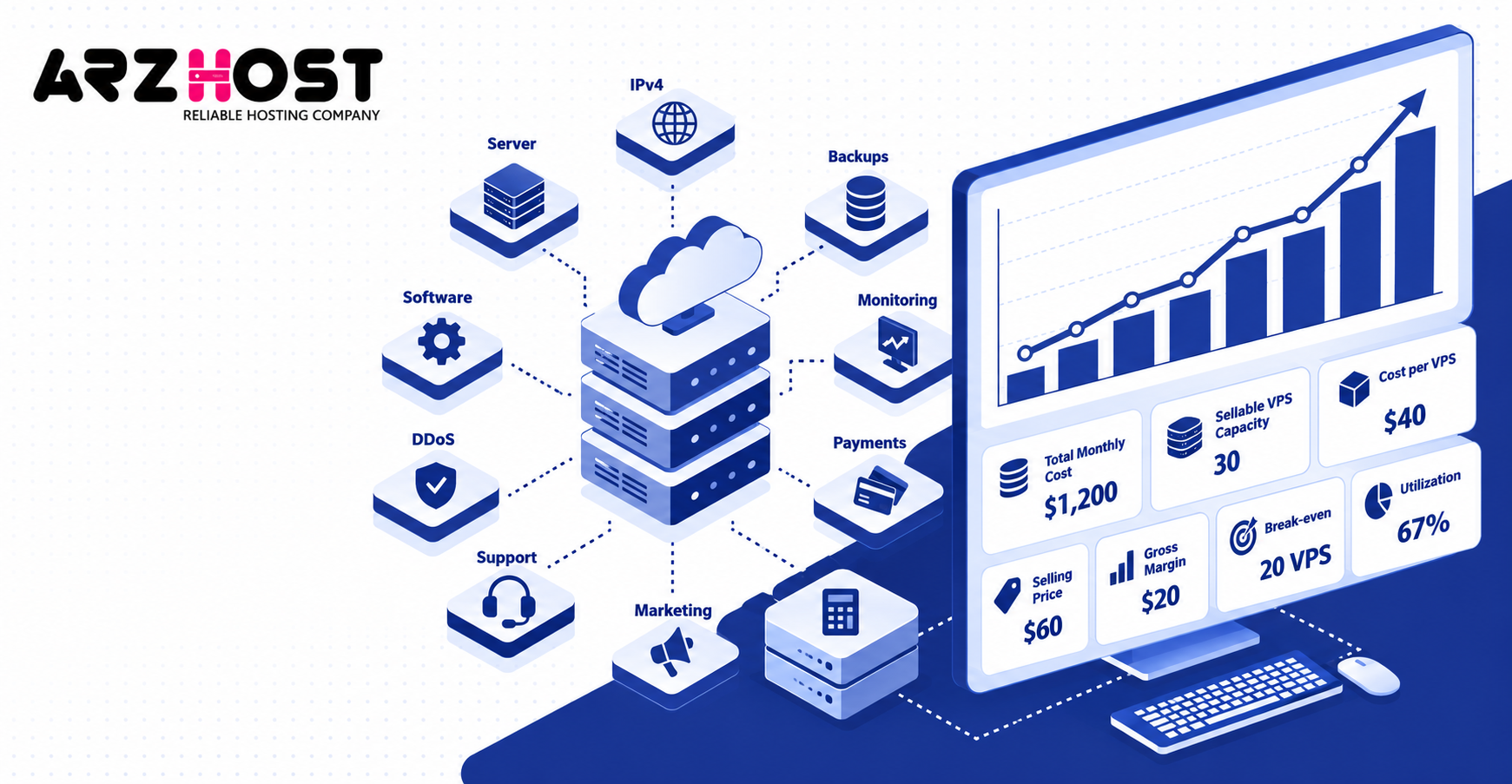
Track every recurring cost that affects your VPS service. Use real supplier prices instead of rough assumptions. Update your calculations whenever infrastructure or licensing costs change.
Common cost categories include:
- Dedicated server or reseller capacity
- Colocation and power
- IPv4 addresses
- Backup storage
- Virtualization software
- Billing software
- Monitoring systems
- DDoS protection
- Payment processing
- Fraud and chargebacks
- Customer support
- Marketing
- Accounting
- Legal administration
Suppose your total monthly operating cost is $1,200. If you can reliably sell 30 VPS instances, your average operating cost becomes $40 per VPS. That figure will change as utilization and support costs change.
Do not divide costs by maximum theoretical capacity. Some capacity must remain available for host overhead, failures, migrations, and performance headroom. Use the number of VPS instances you can safely sell.
Calculate Cost per VPS and Profit Margin
Calculate cost per VPS using actual sellable capacity. This gives you a more realistic minimum selling price. It also helps you estimate node level profitability.
Use this formula:
Cost per VPS = Total monthly operating cost ÷ Sellable VPS capacity
Then calculate gross margin:
Gross margin per VPS = Selling price − Direct VPS cost
If monthly operating costs are $1,200 across 30 sellable instances, each instance costs $40. Selling that VPS for $60 leaves $20 before taxes, marketing, and unexpected expenses. Your final net profit will therefore be lower than $20.
Utilization also affects profitability. A node built for 30 customers loses money if only 10 remain active. Track occupancy and break-even utilization for every server.
Choose Your Server Hardware and Data Center
Choose VPS hardware around workload density, storage performance, network capacity, and failure tolerance. CPU core count alone does not determine a good VPS node. RAM, disk latency, IOPS, and network throughput can become bottlenecks first.
Your data center also affects reliability and customer experience. Review network quality, remote hands, IP availability, DDoS protection, and hardware replacement procedures. Choose locations close to the customers you plan to serve.
CPU, RAM, NVMe Storage, and Bandwidth
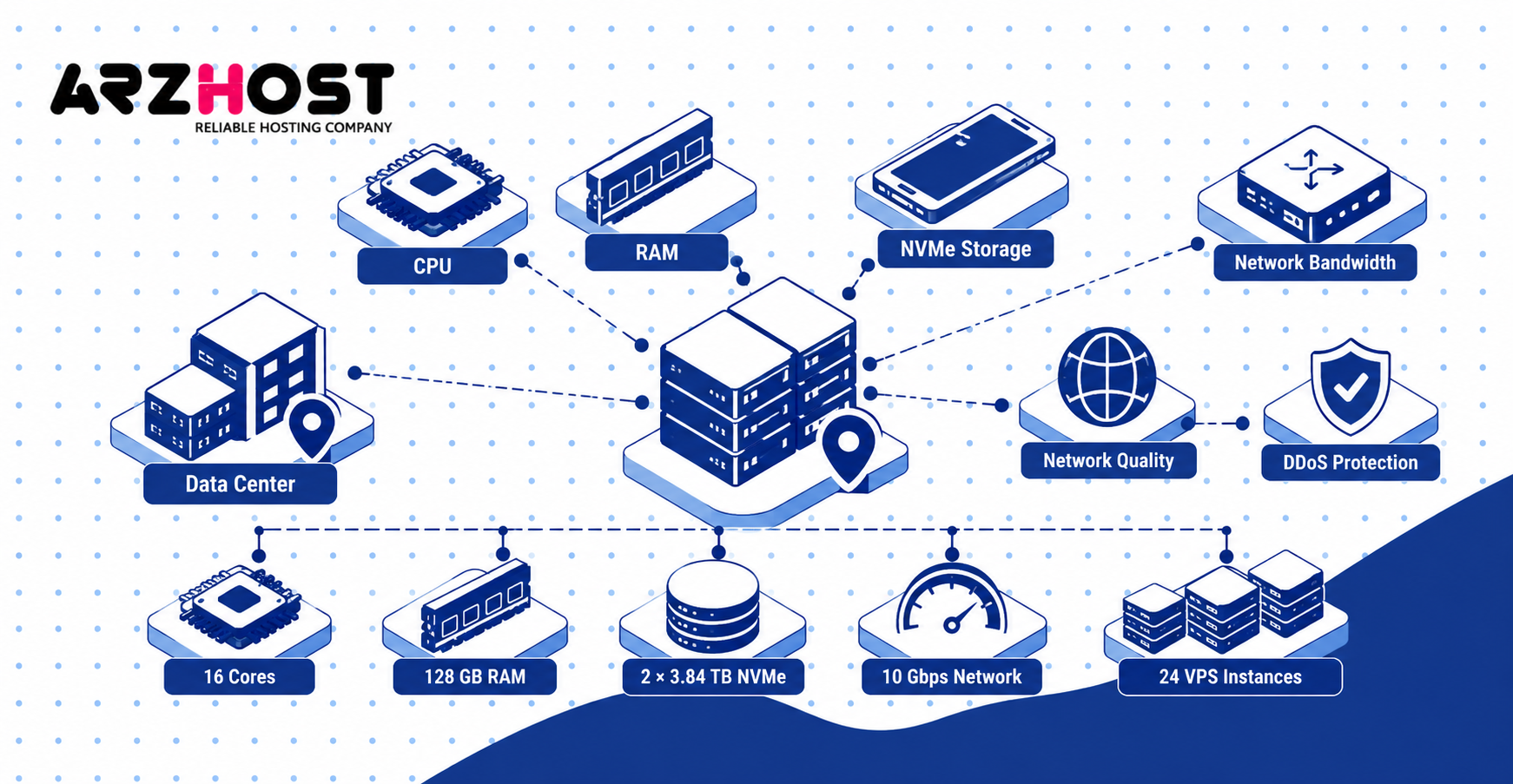
A VPS node needs balanced CPU, RAM, storage, and network resources. Server processors like AMD EPYC and Intel Xeon are common options. Compare core count, clock performance, memory capacity, and platform cost.
RAM controls how much memory you can allocate across virtual machines. ECC RAM can detect and correct certain memory errors. Reserve memory for the host, virtualization services, caching, and operational headroom.
NVMe storage is important because many VPS customers can generate disk activity at the same time. Evaluate capacity, endurance, latency, IOPS, and redundancy. A large drive with poor endurance may be unsuitable for a busy VPS node.
Network capacity must support aggregate customer traffic. A 1 Gbps port cannot provide 1 Gbps simultaneously to 20 VPS customers. Design bandwidth limits around real shared capacity.
How Many VPS Instances Can One Server Handle?
The number of VPS instances depends on RAM, CPU usage, disk performance, bandwidth, and customer workloads. There is no universal VPS per server figure. Different workloads stress different resources.
Consider this example node:
- 16 physical CPU cores
- 128 GB RAM
- 2 × 3.84 TB NVMe drives
- 10 Gbps network connectivity
- 16 GB reserved for the host and headroom
The node has about 112 GB of allocatable RAM before additional safety margins. Twenty four VPS instances with 4 GB RAM would allocate 96 GB. That leaves additional memory for host services and workload variation.
RAM alone does not guarantee that 24 VPS instances will perform well. CPU contention, storage latency, or bandwidth usage may reach their limits first. Monitor real customer workloads before increasing density.
Set Up Your Virtualization and VPS Management Stack
Your virtualization stack creates and manages isolated customer virtual machines on each physical node. The hypervisor, management platform, and billing system perform different jobs. Keep those layers clearly separated.
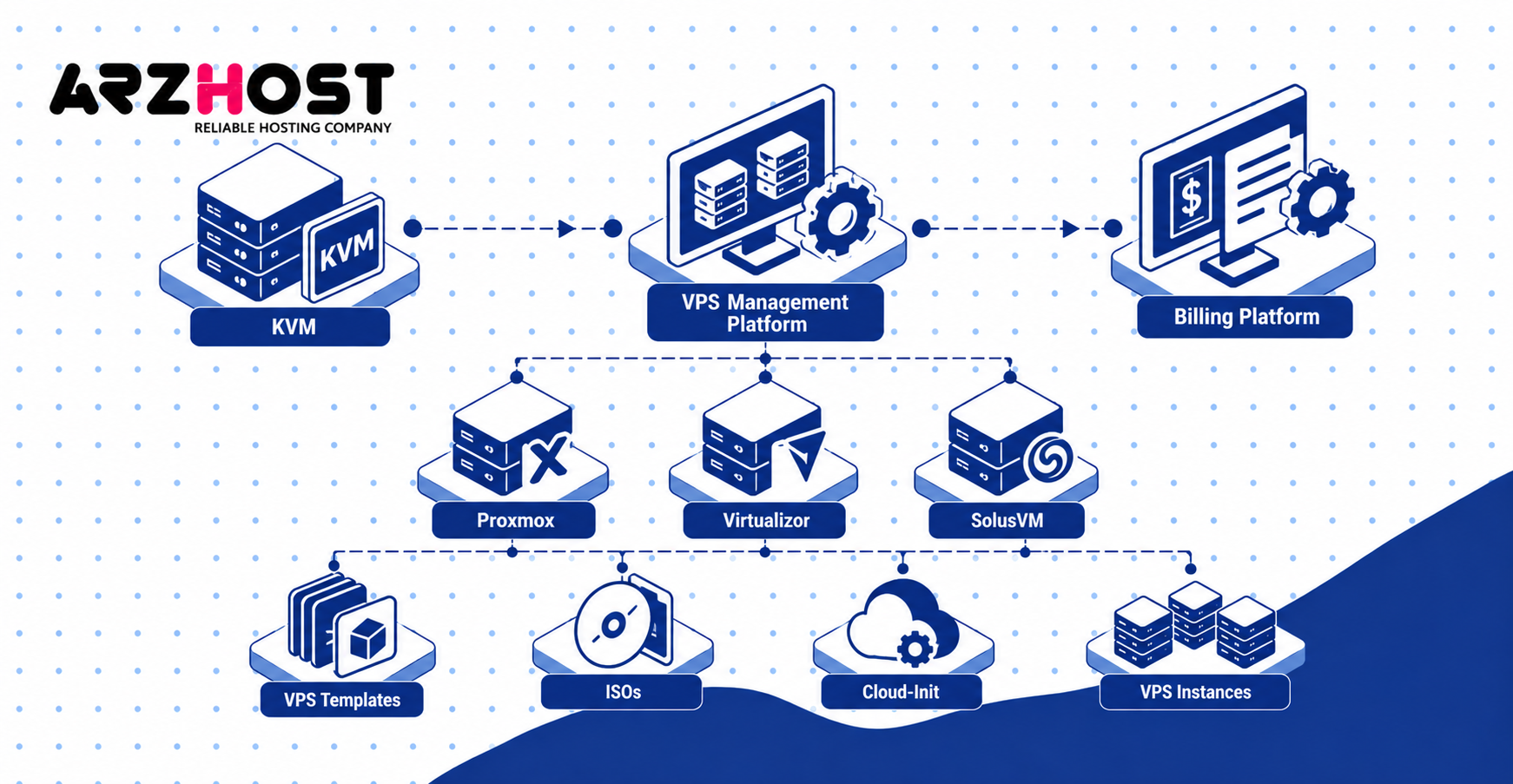
A common architecture is:
KVM → VPS Management Platform → Billing Platform
KVM runs the virtual machine. The management platform controls the VPS lifecycle and infrastructure. The billing platform handles orders, payments, renewals, and customer accounts.
KVM, Proxmox, Virtualizor, and SolusVM
KVM provides virtualization, while platforms like Proxmox, Virtualizor, and SolusVM manage VPS environments. KVM creates full virtual machines using Linux virtualization features. It can run Linux and Windows guest operating systems.
Proxmox VE combines KVM virtual machines and LXC containers within one management platform. It also supports networking, storage, clustering, migrations, backups, and API access. It works well when you want broad infrastructure control.
Virtualizor focuses heavily on VPS hosting workflows. It supports VPS creation, templates, networking, backups, migration, billing integrations, and APIs. It is commonly used when automated hosting operations are a priority.
SolusVM is another hosting focused VPS management platform. It provides customer controls, billing integrations, templates, backups, and infrastructure management. Compare all platforms against your automation and support requirements.
VPS Templates, ISOs, and Cloud-Init
Templates and cloud-init allow you to deploy consistent VPS instances automatically. Maintain current images for systems like Ubuntu, Debian, AlmaLinux, and Rocky Linux. Test every image before making it available.
ISO support allows customers to perform custom operating system installations. Set limits for uploaded media, storage usage, and retention. Remove abandoned ISO files when they are no longer required.
Cloud-init configures a new VPS during its first boot. It can configure networking, SSH keys, users, packages, and storage settings. This reduces manual work during provisioning.
Templates also make troubleshooting easier. Every customer starts from a known system image. Standardization becomes increasingly important as customer numbers grow.
Set Up Networking, IPv4, and IPv6
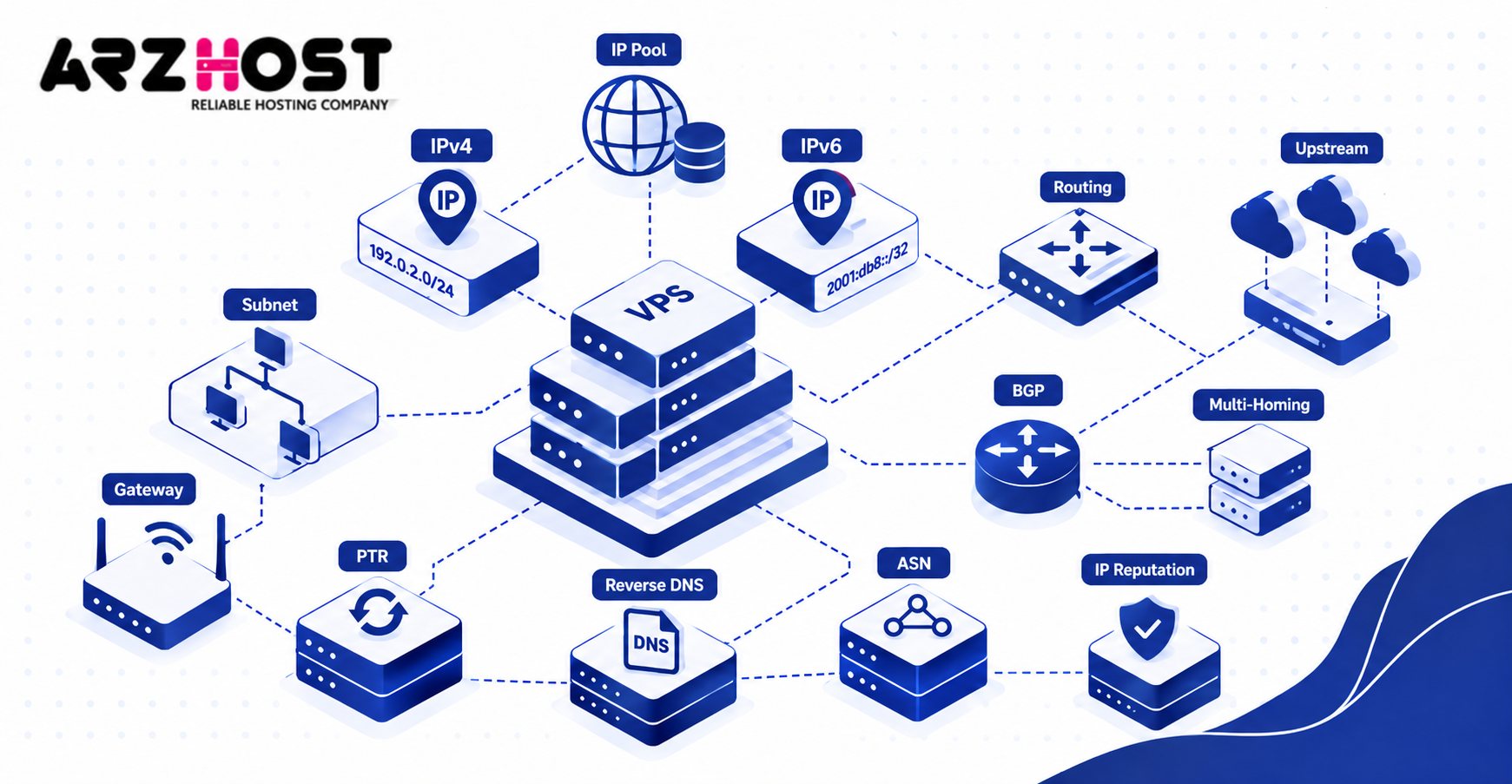
Your VPS network must assign addresses, route traffic, provide reverse DNS, and enforce network limits. New providers often begin with IP resources supplied by their upstream provider. Independent routing becomes more relevant as the company grows.
IPv4 should be treated as a limited resource. Include IPv4 costs in every VPS pricing calculation. Support IPv6 from the beginning where your infrastructure allows it.
IP Pools, Subnets, and Reverse DNS
Use organized IP pools so your system knows which addresses are available or assigned. Store the IP address, gateway, subnet, node, customer, and VPS identifier. Automated provisioning should update this inventory immediately.
Treat IPv4 and IPv6 separately because their addressing structures differ. Your provisioning platform should configure both protocols correctly. Test networking after every operating system template update.
Reverse DNS maps an IP address back to a hostname. It uses PTR records for this purpose. Reverse DNS can be important for applications like mail services.
Allow customer-controlled reverse DNS where your platform supports it. Monitor IP reputation because one abusive customer can affect future users. Keep clean and flagged IP ranges clearly documented.
When You Need an ASN or BGP
You usually need an ASN when you operate independent routing or exchange routes with other networks. A small VPS company using one upstream provider normally does not require its own ASN. The provider can route assigned addresses directly to your infrastructure.
BGP becomes more relevant when you operate multiple upstream networks. It is also useful when announcing independent IP space. These setups give you more network control but require greater expertise.
Multi homing can improve network resilience. It also introduces routing policies, filtering, monitoring, and security requirements. Do not implement BGP without clear operational need.
Start with upstream routing unless independent networking supports your business model. Add advanced network infrastructure when capacity and customer requirements justify it. Complexity without a clear benefit increases operational risk.
Automate Billing and VPS Provisioning
Automate the complete customer lifecycle from payment through termination. VPS provisioning should not depend on manual staff actions after every order. Automation reduces delays and inconsistent configuration.
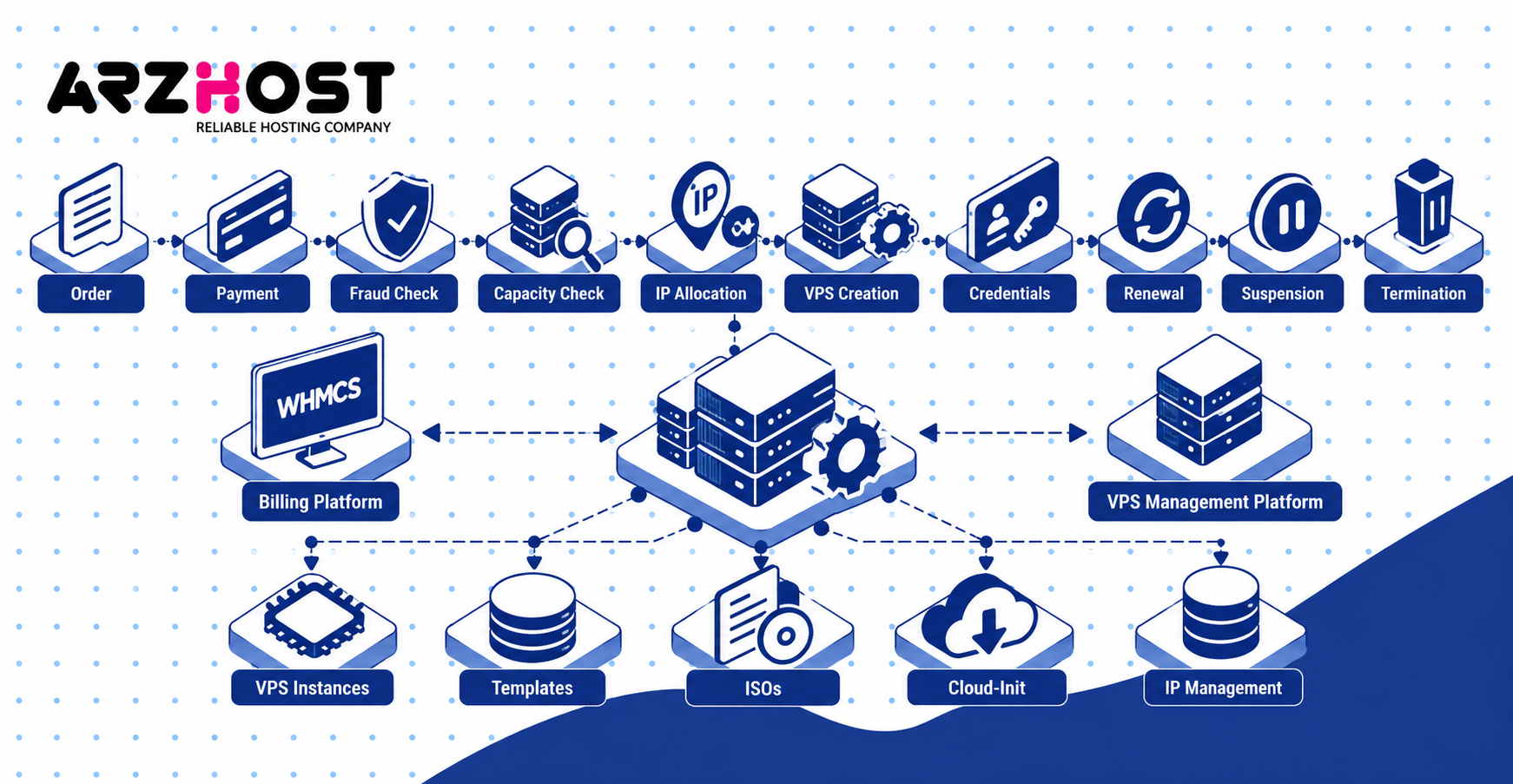
A typical workflow is:
Order → Payment → Fraud Check → Capacity Check → IP Allocation → VPS Creation → Credentials → Renewal → Suspension → Termination
Each stage should produce logs. Failed provisioning should create an alert or review task. Never allow failed automation to disappear silently.
Connect WHMCS to Your VPS Platform
WHMCS can connect billing products with supported VPS provisioning systems. It handles customer accounts, invoices, payments, services, and recurring billing. Provisioning modules connect those commercial actions with your infrastructure.
Create each VPS plan as a billing product. Map the product to the correct virtualization settings and server group. Test the connection before allowing automatic customer orders.
Your module should support core lifecycle actions. These include VPS creation, suspension, reactivation, termination, upgrades, and password changes. Customer self-service can also include reboot, shutdown, reinstall, and console access.
Never assume a successful payment guarantees successful provisioning. Test API failures, connection failures, and invalid configuration. Build a process for staff to review failed module actions.
Automate Orders, Provisioning, Renewals, and Suspensions
Provision VPS services only after your payment and fraud requirements are satisfied. New customers may require stronger fraud checks than established customers. High-risk orders should enter manual review.
Your automation should handle:
- Customer registration
- Order creation
- Payment confirmation
- Fraud screening
- Capacity validation
- VPS provisioning
- IP assignment
- Credential delivery
- Renewal
- Suspension
- Reactivation
- Termination
Do not assume every API call will succeed. Handle unavailable nodes, exhausted IP pools, missing templates, timeouts, and duplicate requests. Your system should stop safely when required resources are unavailable.
Keep billing and infrastructure status synchronized. A suspended invoice should not accidentally terminate an active service. A terminated customer should not leave unused VPS resources running forever.
Build Your VPS Plans and Manage Server Capacity
Build VPS plans around resources your infrastructure can reliably provide. Each plan should have clear CPU, RAM, storage, traffic, port speed, and IP limits. Avoid launching with dozens of similar products.
Three or four initial plans are usually easier to manage. Each plan should target a different workload size. Add additional plans after real customer demand appears.
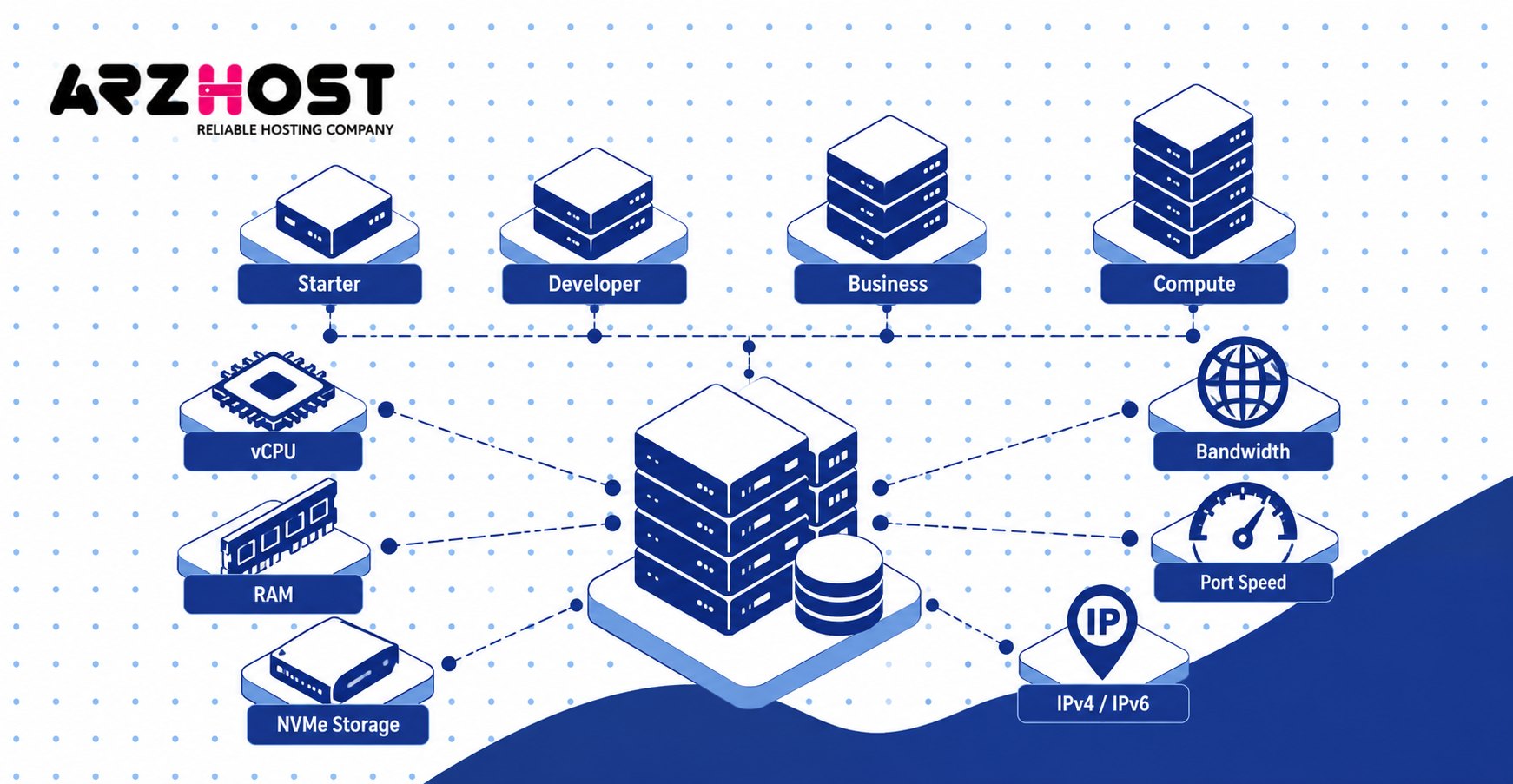
Set vCPU, RAM, Storage, Bandwidth, and IP Limits
Define measurable resource limits for every VPS product. Customers should understand exactly what they are purchasing. Your provisioning software should enforce the same specifications.
A sample catalog could look like this:
| Plan | vCPU | RAM | NVMe | Traffic | IPv4 |
| Starter | 1 | 2 GB | 40 GB | 2 TB | 1 |
| Developer | 2 | 4 GB | 80 GB | 4 TB | 1 |
| Business | 4 | 8 GB | 160 GB | 6 TB | 1 |
| Compute | 6 | 16 GB | 240 GB | 8 TB | 1 |
These figures are examples rather than universal recommendations. Adjust them according to node capacity, bandwidth cost, and customer workloads. Every plan should leave operational headroom.
Explain whether vCPU resources are shared or dedicated. State whether bandwidth refers to traffic allowance or port speed. Also identify whether backups and management are included.
Avoid Overselling and Noisy Neighbor Problems
Overselling becomes a problem when allocated resources exceed what your node can deliver reliably. Some CPU overcommit can work when average customer usage remains low. Aggressive overcommit creates contention and support problems.
A noisy neighbor is one VPS consuming resources needed by other virtual machines. Heavy CPU usage, disk activity, or network traffic can cause this problem. Resource controls should limit the effect of one customer.
Monitor important node metrics:
- CPU utilization
- CPU steal time
- RAM pressure
- Swap usage
- Disk latency
- IOPS
- Storage capacity
- Network throughput
- Packet loss
- Active VPS count
Set internal capacity thresholds before customer performance declines. Begin planning another node before existing infrastructure reaches critical utilization. Leave enough resources for migrations and unexpected workload spikes.
Set Up Backups, Monitoring, Security, and Abuse Handling
A VPS company needs backups, monitoring, security controls, and abuse procedures before launch. These systems protect customer data and infrastructure reputation. They also reduce recovery time when failures occur.
Monitoring should cover both physical nodes and customer-facing services. Backups should exist outside the production server. Security controls should protect infrastructure and the ordering process.
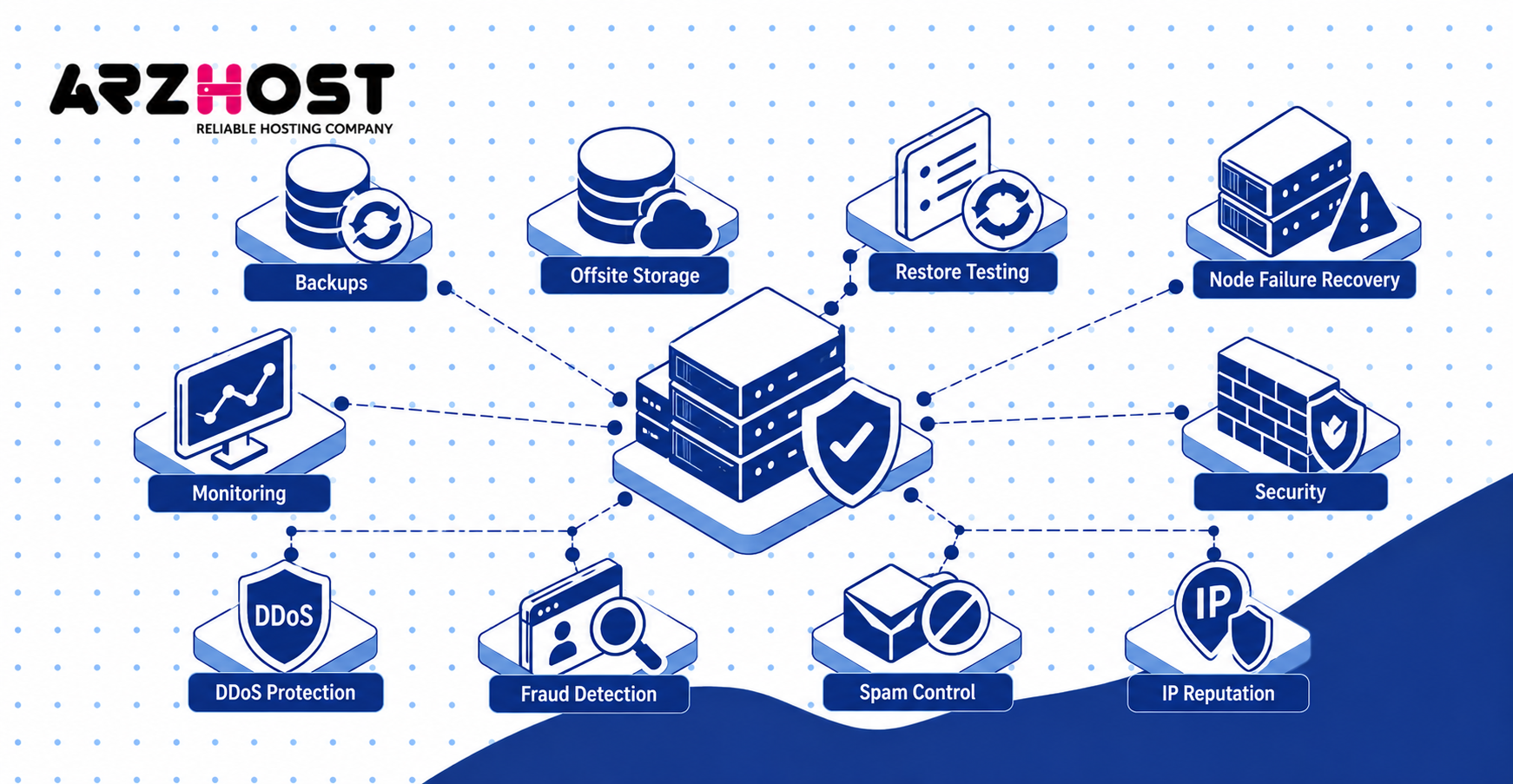
Backups, Restore Testing, and Node Failure Recovery
Store backups outside the physical node running the original VPS. A snapshot stored on the same failed storage system may disappear with the original data. Snapshots and backups should therefore serve different purposes.
Define backup frequency, retention, encryption, and storage location. Also define who is responsible for restoring customer data. Make these policies clear within each VPS plan.
Test restorations regularly. A backup that has never been restored is not fully verified. Record failed tests and correct them before an actual outage occurs.
Create a node failure runbook before launch. Document who investigates, where backups are stored, and how customers receive updates. Include storage failure and complete server failure scenarios.
DDoS Protection, Fraud, Spam, and IP Reputation
Abuse controls protect your network, payment systems, upstream relationships, and IP reputation. VPS hosting can attract legitimate users and abusive customers. Your systems must be prepared for both.
Use fraud screening for suspicious orders. Signals can include payment mismatches, repeated failures, unusual order patterns, and known-risk information. Decide when an order should require manual review.
Your Acceptable Use Policy should address spam, phishing, malware, scanning, botnets, and unauthorized attacks. Create clear warning, suspension, and termination procedures. Apply the same process consistently.
Understand how your upstream network handles DDoS attacks. Possible protections include filtering, scrubbing, or null routing. Explain relevant limitations accurately to customers.
Create Your Legal Policies and Support Process
Publish legal and support policies that match how your company actually operates. Do not copy another hosting provider’s documents without review. Their billing, backup, and abuse procedures may differ from yours.
Your policies should describe billing, renewals, suspensions, backups, privacy, refunds, and prohibited usage. They should also explain what the customer must manage. Have jurisdiction specific requirements reviewed by qualified professionals.
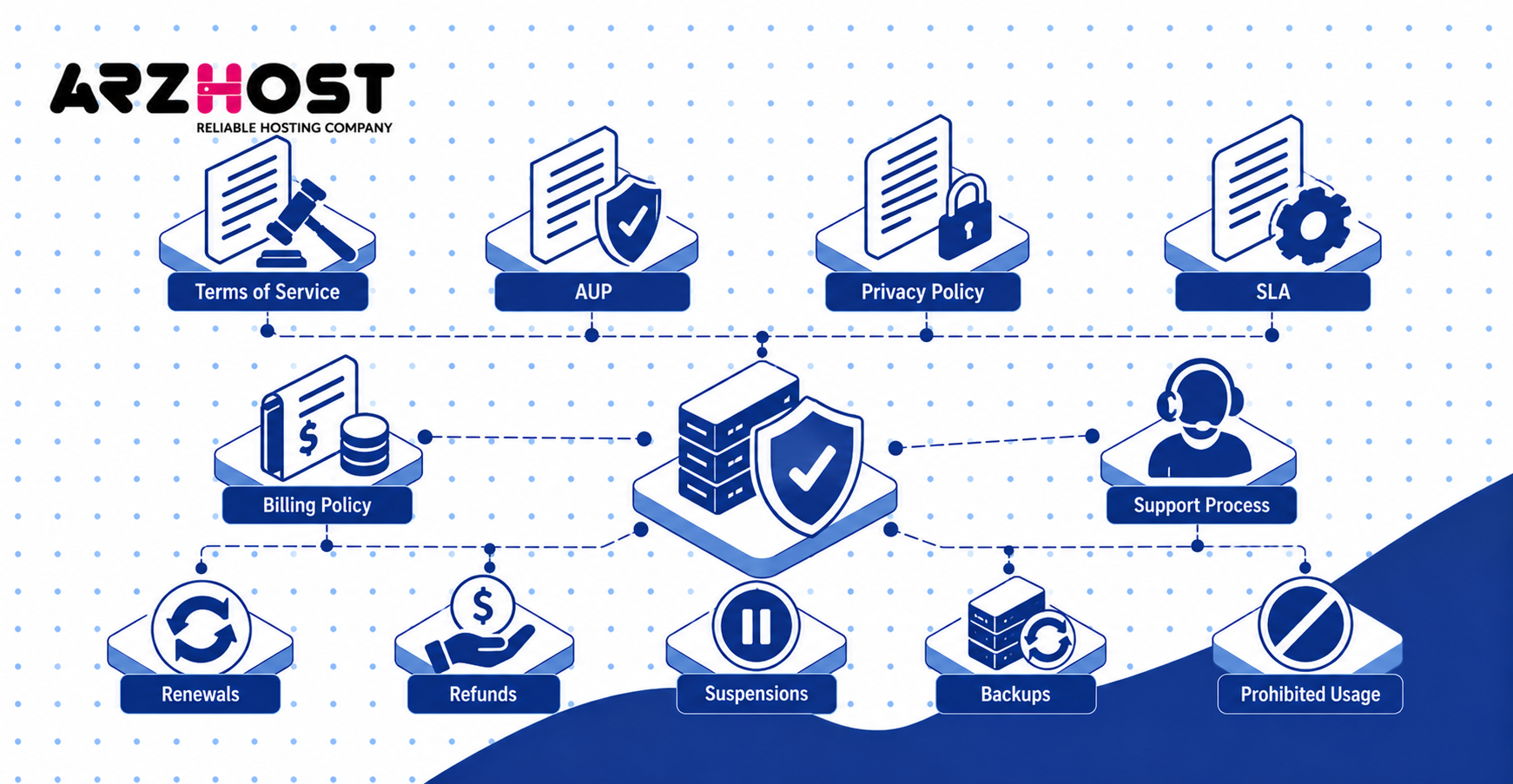
Terms of Service, AUP, Privacy Policy, and SLA
At minimum, define contractual terms, acceptable use, privacy handling, and service commitments. These documents protect different parts of the customer relationship. Keep them consistent with your actual service.
Your Terms of Service can address:
- Billing
- Renewals
- Refunds
- Suspensions
- Cancellations
- Account ownership
- Customer responsibilities
Your Acceptable Use Policy should define prohibited activities. Examples include spam, malware, phishing, unauthorized scanning, and illegal usage. Also explain how abuse reports are investigated.
Your Privacy Policy should explain how customer information is handled. Your SLA should define measurable availability commitments and possible remedies. Avoid promises your infrastructure cannot consistently meet.
Managed vs Unmanaged VPS Support
Define exactly what your support team will and will not manage. Unmanaged VPS plans normally focus on infrastructure availability. Managed VPS plans can include administration inside the customer’s operating system.
Unmanaged support can include:
- Node availability
- Network connectivity
- VPS power controls
- Console access
- Platform failures
- Hardware incidents
Managed support can additionally include:
- Operating system updates
- Security configuration
- Web server configuration
- Control panel assistance
- Service troubleshooting
- Application support
Do not advertise a plan as managed without defining the term. Customers may otherwise expect services you never intended to provide. Display support boundaries on product pages and legal documents.
Test and Launch Your VPS Hosting Company
Test the complete customer journey before accepting public orders. A successful virtual machine creation test is not enough. Billing, networking, recovery, notifications, and customer controls must also work.
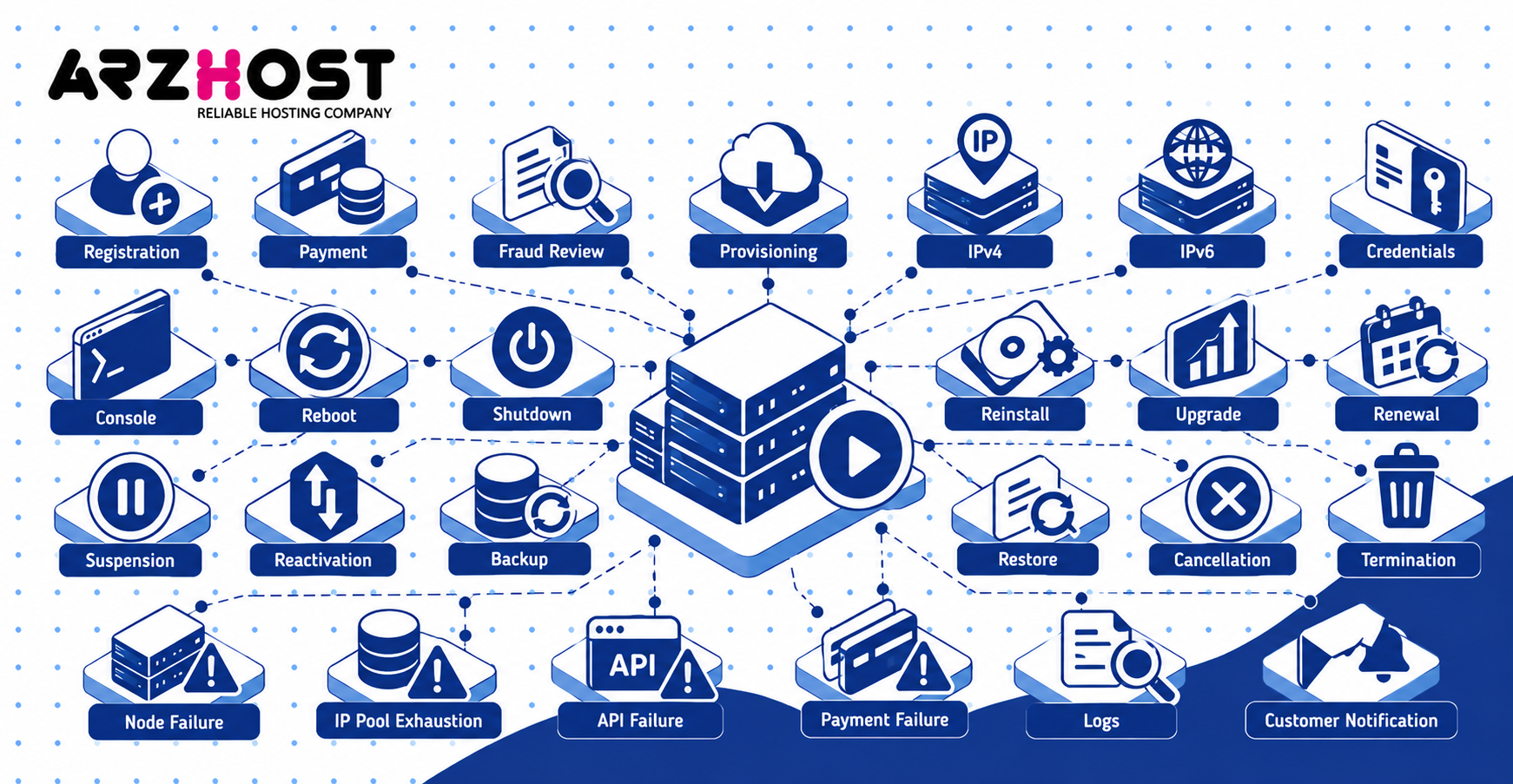
Run these tests before launch:
- Account registration
- Payment processing
- Fraud review
- VPS provisioning
- IPv4 assignment
- IPv6 assignment
- Credential delivery
- Console access
- Reboot and shutdown
- Operating system reinstall
- Upgrade and downgrade
- Renewal
- Suspension
- Reactivation
- Backup creation
- Backup restoration
- Cancellation
- Termination
Test failure scenarios as well. Disable a test node, exhaust an IP pool, reject an API request, and simulate payment failure. Verify that automation stops safely and creates useful logs.
Test customer communication during these failures. Customers need understandable messages when provisioning or billing fails. Support staff also need enough information to investigate each incident.
Get Your First VPS Customers
Choose one customer segment and build your first offer around its real hosting requirements. Competing only on price makes differentiation difficult. A defined niche helps you build clearer products and landing pages.
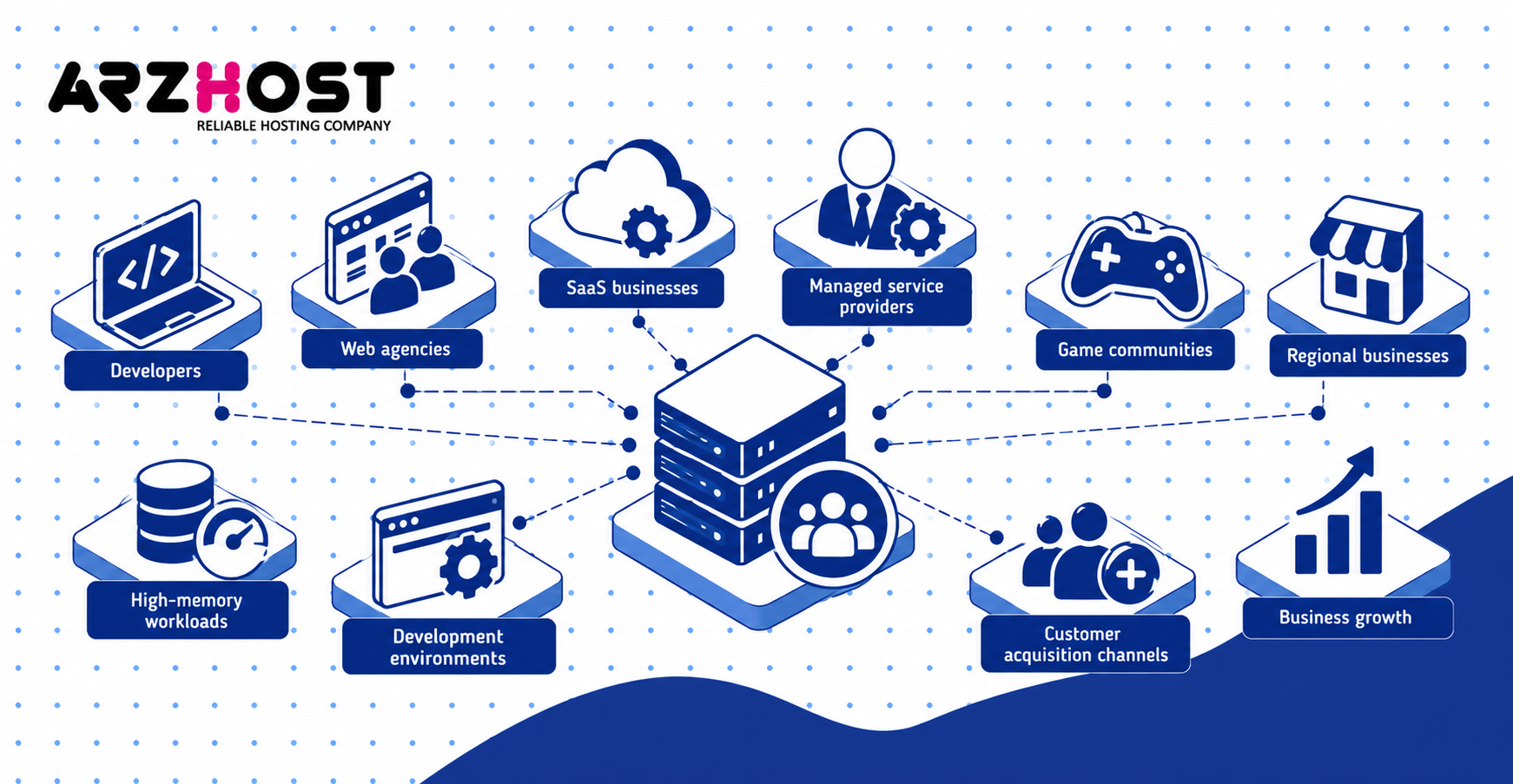
Potential customer segments include:
- Developers
- Web agencies
- SaaS businesses
- Managed service providers
- Game communities
- Regional businesses
- High memory workloads
- Development environments
Developers may value API access, cloud-init, Linux images, and fast provisioning. Agencies may value managed support, backups, and predictable billing. Regional users may care most about location and latency.
Create landing pages around specific customer requirements. Explain processors, storage, network limits, backups, locations, and support levels. Avoid vague claims that customers cannot verify.
Customer acquisition channels can include SEO, referrals, existing hosting customers, partnerships, and technical communities. Track acquisition cost, conversion rate, churn, recurring revenue, and support usage. Scale marketing only after customer economics makes sense.
Scale Beyond Your First VPS Node
Add infrastructure before existing nodes become operationally constrained. Scaling involves more than adding another physical server. Monitoring, IP management, backups, automation, and inventory must also scale.
Track each node separately. Monitor free RAM, CPU contention, storage capacity, disk latency, network usage, and available IP addresses. Set thresholds that trigger expansion planning.
Once you operate multiple nodes, automate placement where possible. New VPS instances should be deployed onto servers with sufficient capacity. Manual placement becomes increasingly unreliable as node counts increase.
Adding more locations creates additional operational complexity. Each location requires monitoring, backups, networking, IP management, and support procedures. Expand geographically only when customer demand justifies the cost.
Plan hardware migrations before servers reach end of life. Test how virtual machines move between nodes with minimal disruption. Keep infrastructure inventory accurate throughout every migration.
Common Mistakes When Starting a VPS Company
Common VPS startup failures usually come from weak pricing, capacity planning, automation, and operational controls. These problems often remain hidden until customers begin using the platform. Address them before launch.
Avoid these mistakes:
- Buying hardware before proving customer demand
- Pricing VPS plans using only server rental cost
- Overselling CPU without monitoring usage
- Ignoring storage IOPS and latency
- Treating snapshots as complete backups
- Keeping backups on the production node
- Ignoring IPv4 cost and availability
- Launching without testing provisioning failures
- Offering undefined managed support
- Ignoring fraud until chargebacks increase
- Ignoring spam until IP reputation declines
- Launching too many VPS plans
- Adding locations before demand exists
- Managing IP allocation manually
- Failing to reserve node headroom
- Ignoring failed billing module actions
Treat the VPS company as one connected operating system. Infrastructure, billing, support, security, and customer communication must work together. Strong hardware alone cannot compensate for weak operational processes.
Conclusion
In conclusion, starting a virtual private server company requires more than purchasing server hardware and installing virtualization software. You need sustainable pricing, reliable infrastructure, automated provisioning, organized networking, backups, security, support, and clear operating policies.
Start with the infrastructure model that matches your budget and technical ability. Test every billing, provisioning, networking, backup, and recovery workflow before accepting customers. Track real resource usage and profitability as your customer base grows.
Scale only after your first infrastructure model works consistently. Add nodes, locations, and advanced networking when customer demand justifies them. Start by choosing your VPS business model and calculating the true cost and sellable capacity of your first node.
Frequently Asked Questions
How much does it cost to start a VPS company?
The cost depends on whether you resell VPS capacity, rent dedicated servers, or own hardware. Reselling usually requires the least initial capital. Dedicated servers and colocation increase costs and technical responsibilities.
Build a monthly financial model before deciding your budget. Include infrastructure, software, IP addresses, backups, support, payment fees, and marketing. Keep additional cash available for failures, refunds, and unexpected costs.
Can I start a VPS company with one server?
Yes, one dedicated server can support an initial VPS service. The number of customers depends on RAM, CPU demand, storage performance, and bandwidth. Do not estimate capacity using memory alone.
A single node also creates a large failure domain. Every VPS on that server may become unavailable if the node fails. Keep external backups and a recovery plan from the beginning.
Can I start a VPS business without owning hardware?
Yes, you can start using VPS reseller capacity or rented dedicated servers. Both options avoid purchasing physical servers. They differ mainly in control and operational responsibility.
A VPS reseller model delegates more infrastructure work to the upstream provider. A dedicated server gives you greater control over virtualization and resource allocation. Choose the model matching your budget and technical ability.
Is a VPS hosting business profitable?
A VPS company can be profitable when revenue exceeds infrastructure and operating costs. Profit depends on utilization, pricing, support workload, fraud, churn, and customer acquisition. A powerful server does not create profit when most capacity remains empty.
Track profitability by node and product. Include backups, software, IP addresses, payment fees, and support costs. Review pricing whenever infrastructure costs or customer usage changes.
Where do VPS companies get IPv4 addresses?
New VPS companies usually receive IPv4 addresses from their infrastructure or data center provider. Larger providers may later use independent address space and their own routing. The correct approach depends on network size and business requirements.
Treat IPv4 addresses as limited inventory. Monitor free, assigned, reserved, and flagged addresses carefully. Support IPv6 from the beginning wherever possible.