
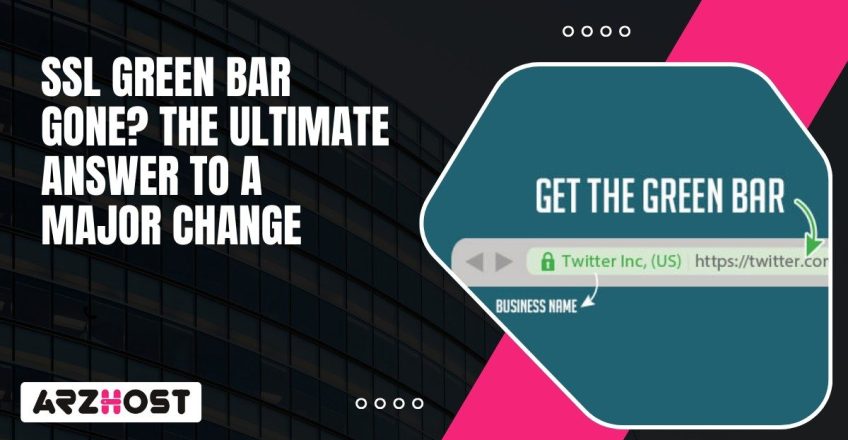
A couple of years back, the browsers would highlight secure websites by displaying a green address bar. It was a simple method of determining whether a site had a valid and encrypted connection and an authentic SSL certificate. Then it went away, and most people did not really notice.
It was not some glitch or security degradation. It was an intentional action on the part of browser developers who wished HTTPS to be normal, and not special. Such a minor adjustment speaks volumes regarding the evolution of web security and the way people are supposed to consider the matter of trust on the internet nowadays.
When HTTPS appeared, it solved two growing problems on the early web: keeping data private and confirming that a site was real. SSL certificates handled both by encrypting traffic and verifying server identity. That combination shaped how browsers built trust online.
With the growth of the internet, such Certificate Authorities as DigiCert and GlobalSign began to provide more powerful types of verification. One was the Extended Validation (EV) which required companies to establish their legal identity prior to authorization. Browsers emphasized an additional security associated with a green address bar and the verified name of the company next to the padlock.
The idea was to make security visible. If users saw the color and the name, they’d feel confident sharing information. For a while, it worked. The green bar became a quick signal that a website had passed a higher standard of authentication.
Related Article: How to Fix HTTPS Not Working in Chrome
Over time, browser teams realized the green bar wasn’t doing what they hoped. Research showed most users had no idea what the color meant. Many thought it simply confirmed the site was safe, even if they didn’t recognize the domain. Such a misconception brought about false security.
Phishing sites began using HTTPS too. Attackers could get domain-validated SSL certificates within minutes and copy a brand’s look almost perfectly. The green padlock, once a sign of legitimacy, became meaningless in practice.
Browser developers started rethinking how to show security. Google Chrome, Mozilla Firefox, and Apple Safari decided that the default should be encryption. Rather than providing HTTPS with some additional color or icons, they decided to go the other way around: they would only give the user warnings when a connection is not encrypted or obviously insecure.
That change simplified how people interpret browser signals and pushed the web toward universal HTTPS, which is exactly what those indicators were meant to encourage in the first place.
As the green bar went away, browsers did not lose security indicators. They redesigned them. The current browsers are displaying plain gray padlock, or no icon at all. The goal is consistency. Users are presented with the same thing on all HTTPS sites and an emphasis is placed on warnings rather than assuring.
The technical details, however, are still there, but not on screen. Even after clicking on the padlock in Chrome or Firefox, you are able to see the type of encryption and the connection status as well as the certificate of the SSL. It is presented there to those who know what they are searching, and no longer involves cluttering the main-screen.
The shift indicates the normalization of encryption. HTTPS is no longer anything special, but the default. Secure connections are made the default so that browsers promote a safer web without having to depend on color or symbols to demonstrate this claim.
When you are in charge of a site, the length of the green bar has no bearing on what really shields it. The point now is that it depends upon the quality of your SSL and TLS settings.
Begin by applying TLS 1.3 as it is quicker and more secure than the older ones.
Include HTTP Strict Transport Security (HSTS) to ensure the use of secure connection.
Automate certificate renewal by using a provider such as Let’s Encrypt that ensures that you will not run the risk of an expired SSL certificate to destroy trust or provide warnings.It assists in monitoring certificate transparency logs as well. They facilitate the process of identifying whether one is issuing a forgery certificate in your domain. This is the default setting of most significant Certificate Authorities, but the monitoring tools can warn you as soon as anything appears suspicious.
In addition to encryption, credibility has turned into what people can see. Well defined branding, proper contact details and consistent content are rather more effective in instilling trust than any padlock icon ever has been. That is what makes the visitors know that your site is a real one and it is worth communicating with.
The padlock mark does not mean that it is safe. It only shows that you have encrypted communication between your browser and the site with HTTPS. It means that your information is safely transported however it does not guarantee to you who is operating the site and whether it is a reliable site.
Phishing pages use HTTPS too. The attackers can create domains that appear similar to actual ones such as replacing one letter with another within a brand name or inserting an additional word. This is why it is better to take time before entering the details to log in or payment information. As an illustration, you should always ensure the correct spelling of the URL, examine the grammar and check the availability of working contacts on the site.
Verified payment gateways, clear-cut refund policies, trusted SSL certificates by well known Certificate Authorities are the typical order of the day among legitimate businesses. Whenever something is wrong or the web page is hiding something, close it. The contemporary encryption provides safety of the data privacy, but it is the human consciousness that helps to make the data safe.

Start Your Online Journey with ARZ Host! Get Fast, Secure, and Scalable Hosting.
The green padlock had its time. It made people pay attention to HTTPS when encryption was new, but the internet has since evolved. Today, secure connections are the standard, not the byline. The real thing is the feel of credibility that a site will have upon one entering the site.
Browsers have taken this step to make the process of comprehending safety on the Internet easier. They rely on silent continuity and explicit warnings whenever things are wrong instead of flashy icons. That is more user-friendly and site-friendly.
To an individual in charge of managing a web site, there is no longer any need to pursue visual cues. It is to create actual trust, by means of open identity, truthful information, and powerful security customs, such as TLS 1.3 and HSTS. To users, it is all about what to seek other than the padlock: domain accuracy, company legitimacy, and sound payment processing.
The internet did not lose a symbol of trust. It simply transferred that trust to the place it belongs- in the manner that sites demonstrate their security and defend their visitors on a daily basis.
User teams discovered that people did not actually know what the green bar was all about. The majority of individuals thought that it was some sort of guarantee that the site was safe, but the thing is, it only displayed the fact that it had a valid SSL certificate. After HTTPS became the standard on most of the web, Chrome, Firefox, and Safari concurred that it would be more effective to warn users about unsafe sites rather than rewarding safe ones.
They are still useful, but not in the same way they were before. EV certificates will continue to vindicate the legal identity of a business, which may be needed by banks, government sites, and large businesses. The change is that the validation does not appear so prominently in the address bar of the browsers. EV certificates can now be used as a back-end authentication feature.
Both, in a way. The fact that the green bar was removed did not make the websites any safer per se, though, it did force the developers to switch to HTTPS as the default. That changed encryption to a universal one. The browser warning has now become clearer and can be hardly ignored as users can discover there is something wrong.
You need to begin with the domain name.. Red flags are typo errors or additional words. To view the certificate information and who issued a certificate, you can click the padlock in your browser. When transactions are high risk, seek credible payment gateways as well as contact details of the company. Verification is not a problem in real organizations.
Yes. Attackers tend to purchase domain-validated certificates because it is cheap and easy to get. The protection provided by HTTPS is on the connection, but not the validity of the site. This is why the use of visual indicators is not sufficient. Read the message and the environment of the page before submitting sensitive information.
Unlikely. Web security now tends to make encryption transparent. Browsers would like to have HTTPS as an ordinary and consistent site. Future releases are also putting more emphasis on increased notifications about unsafe connections and increased certificate transparency instead of color-coded trust indicators.
Always update certificates, implement HTTPS and HSTS, and connect using TLS 1.3 because it is faster and more secure. Then concentrate on the human trust construction: the familiar branding, correct business information and the truthful communication. Technical security is important, however, usability aspects such as the appearance of a site confer credibility.
Read more:


230 Ave, New York NY, 10001, United States

