


The foundation of a good user experience is a fast website. Slower pages can reduce engagement and conversions, estimated threshold for every website loading speed is 2.5s. As a result, no owner of a WordPress website can afford to overlook website speed.
Google uses Core Web Vitals within its page experience ranking systems, but performance is one of many ranking signals session duration and an enhanced bounce rate, the website’s performance is also essential.
Assume for the moment that you have done marketing and search engine optimization (SEO) well, But what happens if every bit of your endeavor is wasted because websites load slowly?
we’ll examine some of the Top 6 Website Performance Testing Tools in this post, along with their features and advantages, to help you select the ones that will work best for you.
How Testing Tools Improve Website Performance
Website testing tools refer to a set of software applications designed to assess and evaluate the performance, functionality, and usability of a website. These tools play a crucial role in ensuring that a website meets specified requirements and performs optimally across various devices and browsers.

Website testing is a vital step in the development process to identify and rectify issues before a site is launched, preventing potential problems that could negatively impact user experience.
One category of website testing tools, which focus on assessing a website’s speed, responsiveness, and overall efficiency.
Usability testing tools focus on the user interface and overall user experience of a website. They gather insights on how easily users can navigate through the site, providing feedback on design, layout, and accessibility.
Cross-browser testing tools are specifically geared towards ensuring a website function consistently across different web browsers.
Website testing tools can be used for a variety of purposes, such as:
- Functional testing: This type of testing ensures that the website’s features work as expected.
- Performance testing: This type of testing measures the website’s speed and responsiveness.
- Usability testing: This type of testing evaluates how easy it is for users to navigate and use the website.
- Security testing: This type of testing identifies vulnerabilities that could be exploited by hackers.
Why Page Speed is Crucial for Your Website:
loading performance with user-centric metrics. Good Core Web Vitals targets are LCP within 2.5 seconds, INP within 200 milliseconds, and CLS no higher than 0.1 at the 75th percentile. When users are not frustrated by a slow-loading page, they are more likely to interact with content and graphics that load smoothly.
Page load speed is something that many website owners frequently forget about it because they don’t test their site frequently. A website should be speed-tested before it is submitted to google search console
Slow loading can increase abandonment and reduce engagement, but bounce rate also depends on content relevance, search intent, usability, and measurement configuration.
Page speed is crucial for several reasons, impacting both user experience and the overall success of a website. Here are some key reasons why page speed is important:
- User Experience: Users expect websites to load quickly and efficiently. A slow-loading page can frustrate visitors and lead to a poor user experience. In today’s fast-paced digital environment, people are less patient, and a delay of just a few seconds can result in users abandoning a site.
- Search Engine Rankings: Search engines, such as Google, take page speed into consideration when determining search rankings. Performance can contribute to page experience, but relevance and content quality remain stronger ranking considerations. Google has indicated that page speed is a ranking factor, emphasizing the importance of optimizing website performance for improved visibility in search engine results.
- Mobile Experience: With the increasing use of mobile devices, optimizing page speed becomes even more critical. Mobile users may face slower internet connections, and a fast-loading mobile website ensures a better experience for this audience. Google, for instance, uses mobile-first indexing, considering the mobile version of a site as the primary source for indexing and ranking.
- Conversion Rates: Page speed is directly linked to conversion rates. Faster websites tend to have higher conversion rates because users are more likely to stay engaged and complete desired actions, such as making a purchase or filling out a form. Slow-loading pages can lead to a higher bounce rate, meaning users leave the site without taking any action.
- User Retention: A fast website contributes to user retention. Visitors are more likely to stay on a site that provides a seamless and swift browsing experience. Retaining users is essential for building a loyal audience and increasing the chances of repeat visits.
- Competitive Advantage: In a competitive online landscape, having a faster website can be a distinguishing factor. Users are likely to choose a website that loads quickly over a slower competitor. Page speed can contribute to gaining a competitive edge in the digital marketplace.
- Accessibility: Fast-loading websites are more accessible to a broader audience. Users with slower internet connections, those in areas with limited network infrastructure, or people using older devices can still access and navigate a site more effectively when it loads quickly. For more details, read on Accessibility Is Essential for Websites.
Best Website Performance Testing Tools 2026
Now that you understand the fundamentals of website speed testing, check out some of the top resources to test page loads and enhance website functionality.
The following seven tools cover browser-based speed testing, Core Web Vitals, synthetic monitoring, and application performance monitoring.
1: Google Page Speed Insights: Features and Benefits
Google’s Page Speed Insights is an excellent tool for evaluating a website’s performance based on several factors, including speed.
PageSpeed Insights provides separate mobile and desktop reports using Lighthouse lab data and Chrome User Experience Report field data when sufficient real-user data is available. Given the growing amount of mobile traffic websites receive these days, the mobile version’s score is especially significant.

The current report emphasizes the Core Web Vitals LCP, INP, and CLS, alongside supporting metrics and Lighthouse performance diagnostics. It no longer uses the described FCP and DOMContentLoaded bar interface.
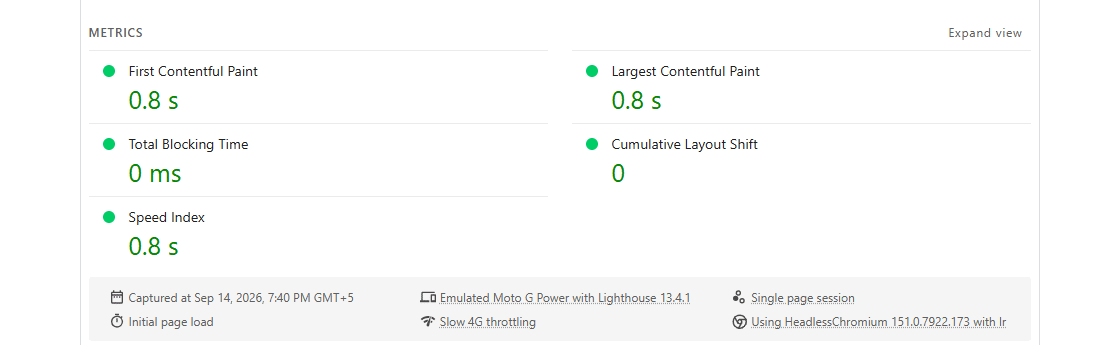
PageSpeed Insights provides Lighthouse opportunities and diagnostics covering render-blocking resources, unused code, caching, image delivery, server response time, layout shifts, and other performance issues.
Related Article: Enhance Your Reseller Website with Google Site Kit
2: GTMetrix: Comprehensive Analysis Capabilities
Another free tool for evaluating the speed of a website is GTmetrix. The comprehensive performance data have made the tool extremely well-liked among the WordPress community. For access to various customization options for the website performance test, I suggest creating a free account.
GTmetrix location, device, browser, and connection options depend on the current account tier. Its modern reports use Chrome-based Lighthouse testing, with advanced locations and mobile testing available on eligible plans.
The top tabs and bottom list are the two areas that makeup GTmetrix’s scorecard. GTmetrix reports display a GTmetrix Grade plus Performance and Structure scores powered by Lighthouse. PageSpeed and YSlow scores belonged to the discontinued legacy report.
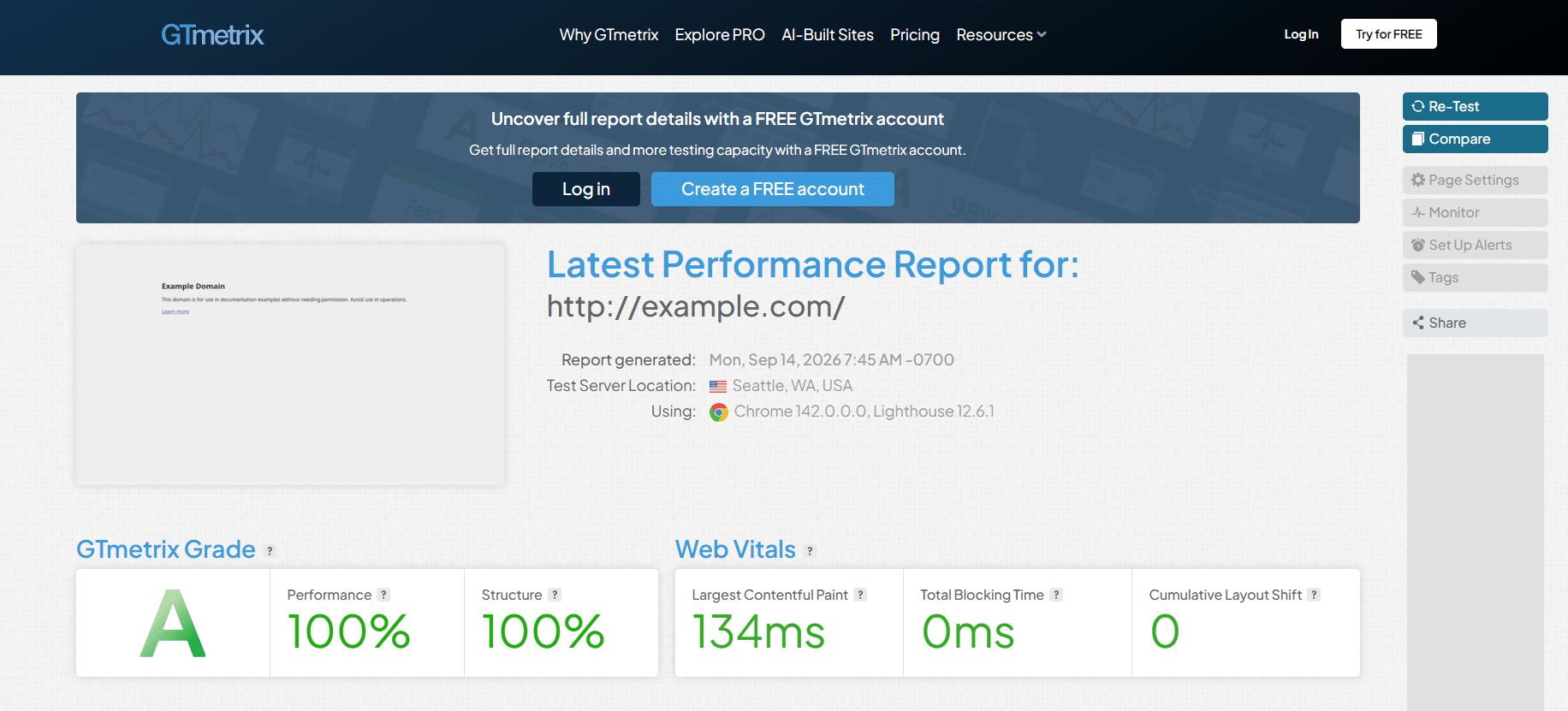
Detailed performance insights are provided in the bottom list. Current reports use Summary, Performance, Structure, Waterfall, Video, and History sections. Each provides insightful information and pinpoints the precise location of the issue.
It is also possible to quickly automate your website’s load time testing at regular intervals!

3: Tools: Real-Time Performance Monitoring
The free Pingdom Website Speed Test runs on-demand synthetic tests from the locations currently available in its interface. Automated real-time monitoring is part of the paid SolarWinds Pingdom service.
4: WebPageTest.org: Detailed Performance Metrics
An excellent resource to evaluate the speed of your website is WebPageTest.org. In addition to analyzing load times, you may do an ICMP traceroute on your websites.
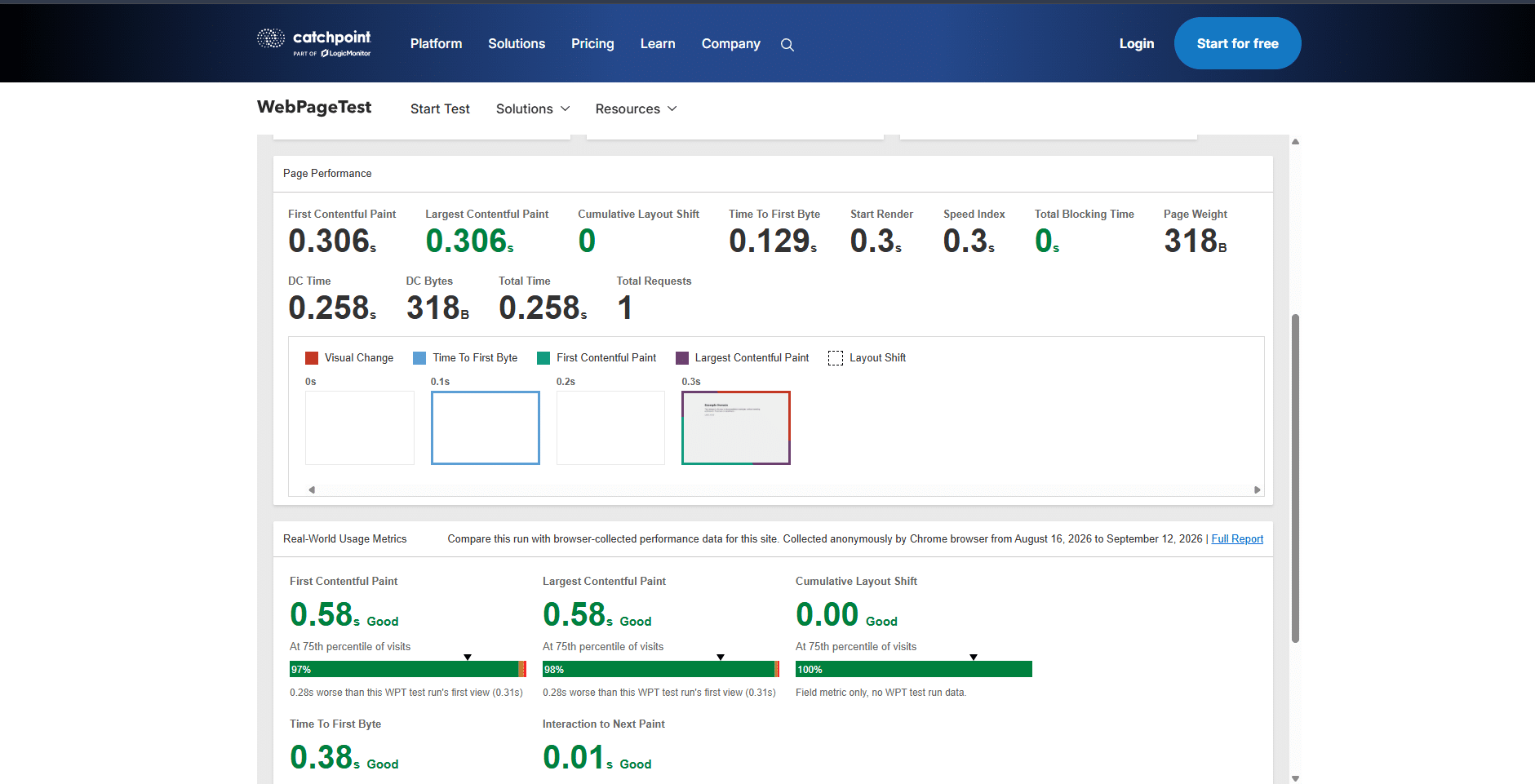
There are options available to you for the location of the test server when it comes to load time study. WebPageTest offers current browser, device, connection, and location combinations based on the selected test agent. Internet Explorer 11 is no longer a standard testing option.
With the advanced options of this page speed insights tool, you may record rendering videos, select a connection type, record network logs, and even add your custom script!
WebPageTest reports Core Web Vitals, Lighthouse results, visual loading metrics, browser timings, request waterfalls, filmstrips, page weight, request counts, and repeat-view performance.

WebPageTest provides request-level waterfall details, including timings, headers, connection information, dependencies, and resource analysis.
5: New Relic: Application Performance Monitoring
One tool for application performance management (APM) is called New Relic. It is a cutting-edge solution for tracking different performance parameters on your website. This program identifies every significant problem causing your website to load more slowly.

The various reports are organized into tabs on the New Relic APM dashboard. New Relic’s PHP agent can collect WordPress-specific hook, plugin, and theme execution metrics. Available detail depends on the PHP agent version and WordPress instrumentation settings.
6: UpTrends: Key Features and Use Cases
A simple tool for verifying the WordPress speed test is UpTrends. Uptrends tests desktop and mobile viewports using current Chrome or Edge browsers, configurable bandwidth throttling, and worldwide test locations. It provides an overall website review, much like GTmetrix and Pingdom.
The report includes Core Web Vitals, W3C navigation timings, a loading filmstrip, PageSpeed recommendations, resource and domain breakdowns, request headers, connection details, and a waterfall.
Using resources such as first-party and third-party sources, Domain Group offers a unique analysis of the website.
Why You Should Use Website Speed Testing Tools: Benefits for UX
I thought it would be helpful to know exactly how speed testing might help you provide a better user experience, so I thought I would compile a list of the most popular website performance indicators to check for and potential problems.
Using website speed testing tools is essential for several reasons, as they provide valuable insights into the performance of your website. Here are some key reasons why you should use these tools:
- User Experience: Website speed directly influences user experience. Slow-loading websites frustrate visitors and can lead to higher bounce rates. Testing your website’s speed helps ensure a smooth and efficient experience for users, which is crucial for retaining and engaging your audience.
- Search Engine Optimization (SEO): Search engines, like Google, consider page speed as a ranking factor. Faster websites are often ranked higher in search results. By regularly testing your website’s speed, you can identify and address performance issues that might negatively impact your SEO efforts.
- Conversion Rates: Studies have shown that faster websites tend to have higher conversion rates. Users are more likely to make a purchase or complete desired actions on a website that loads quickly. Speed testing tools can pinpoint areas for improvement, leading to better conversion rates and, ultimately, increased revenue.
- Mobile Responsiveness: With a growing number of users accessing websites from mobile devices, it’s crucial to ensure that your site performs well on various platforms. Speed testing tools often include features that assess mobile responsiveness, helping you optimize your website for a diverse range of devices.
- Competitive Analysis: Comparing your website’s speed with competitors can offer valuable insights. If your site is significantly slower, it could put you at a disadvantage. Speed testing tools allow you to benchmark your performance against industry standards and competitors, enabling you to make necessary improvements.
- Identifying Bottlenecks: Website speed testing tools provide detailed reports, highlighting specific elements or scripts that may be causing slowdowns. This information is crucial for developers and administrators to identify and address bottlenecks, leading to overall improved performance.
- User Retention: Users are more likely to stay on a website that loads quickly. By consistently monitoring and optimizing your site’s speed, you can enhance user retention, encourage repeat visits, and build a positive online reputation.
- Global Performance: Websites may perform differently based on the user’s location. Speed testing tools often offer insights into how your website performs in different regions, allowing you to optimize content delivery through content delivery networks (CDNs) for a global audience.
Website speed testing tools are valuable for enhancing user experience, improving SEO rankings, increasing conversion rates, ensuring mobile responsiveness, staying competitive, identifying bottlenecks, retaining users, and optimizing global performance.
Regular testing and optimization are essential for maintaining a high-performing and user-friendly website.
Features and Benefits of Website Performance Testing Tools
These tools come with various features and offer several benefits to website developers and administrators. Here are some key features and benefits of website performance testing tools:
| Feature | Benefit |
| Load Simulation | Simulates real-world user traffic by creating virtual users that access the website concurrently. |
| Performance Metrics Measurement | Measures various metrics like response time, page load time, throughput, and resource utilization. |
| Bottleneck Identification | Helps identify performance bottlenecks that are causing slowdowns in the website. |
| Scalability Testing | Tests the website’s ability to handle increased user traffic, ensuring it remains stable and responsive under peak loads. |
| Stress Testing | Pushes the website beyond its normal capacity to identify breaking points and potential failures. |
| API Testing | Allows testing of APIs (Application Programming Interfaces) to ensure they function properly under load. |
| Reporting and Analysis | Provides detailed reports and visualizations of test results, making it easier to understand performance and identify areas for improvement. |
| Recording and Scripting | Allows recording of user interactions to create scripts that can be reused for future testing. |
| Multiple Protocol Support | Supports testing of various protocols like HTTP, HTTPS, FTP, and SOAP. |
| Cloud-based testing | Enables testing from remote servers, eliminating the need for local infrastructure setup. |
| Integrations | Integrates with other tools like CI/CD pipelines for automated testing and continuous deployment. |
| Cost-effective | Some tools offer free and open-source options, making them accessible for businesses of all sizes. |
Your unique demands and financial situation will determine which tool is best for you. While some programs have premium plans with enhanced functionality, others are available as open-source or free versions.
Conclusion: Tips for Using Performance Testing Tools
The best method to overcome challenges, enhance website performance, and provide the greatest user experience is to use a website monitoring tool or a site speed testing service.
FAQS (Frequently Asked Questions)
Q#1: What is website performance testing, and why is it important?
It ensures that the site meets the expected performance standards and provides a seamless user experience. Performance testing is important because slow-loading websites can lead to user frustration, increased bounce rates, and negative impacts on search engine rankings.
Q#2: How do website performance testing tools work?
Website performance testing tools simulate user interactions with the website, measuring various performance metrics such as page load times, response times, and resource utilization. These tools generate reports and analytics that help identify bottlenecks, performance issues, and areas for improvement. Some tools use real user monitoring (RUM) to capture data from actual user interactions, while others use synthetic testing to simulate user behavior.
Q#3: What types of performance testing can these tools conduct?
Performance testing tools typically support various types of testing, including load testing, stress testing, and scalability testing. Load testing assesses a system’s behavior under normal and peak load conditions, stress testing evaluates the system’s stability under extreme conditions, and scalability testing examines the system’s ability to handle increased load and growing user numbers. Comprehensive performance testing tools often include a combination of these testing types.
Q#4: What features should I look for in a website performance testing tool?
When selecting a website performance testing tool, consider features such as protocol support (HTTP, HTTPS, etc.), scripting capabilities for simulating user scenarios, reporting and analytics tools, support for various testing environments (e.g., mobile, desktop), integration capabilities with CI/CD pipelines, and the ability to conduct both synthetic and real user monitoring. A user-friendly interface and robust support and documentation are also essential for effective use.
Q#5: How can website performance testing tools help improve user experience and business outcomes?
By identifying and addressing performance issues early in the development lifecycle, website performance testing tools contribute to a better user experience. Faster load times and responsive web pages can lead to increased user satisfaction, lower bounce rates, and improved conversion rates.
Additionally, a well-performing website positively impacts search engine rankings, customer retention, and overall business reputation. Investing in website performance testing tools is an integral part of ensuring a successful online presence and achieving business goals.
Read More: